
Introduction
Hey everyone, I'm Oil. This guide covers how to pair different LLMs during Vibe Coding and keep your monthly spend under control.
We'll start by reframing how to measure real cost and why official subscriptions give far better leverage than raw APIs; then compare the real strengths and blind spots of Claude, Gemini, and Codex with four subscription setups; and finish with five practical daily habits that cut wasted usage.
Measure Total Task Cost & Subscription Leverage First
Before comparing plans, two baseline principles clear up most pricing confusion.
1. Judge Total Cost to Finish a Task—Not Per-Token Price
A model's real value usually isn't its per-token price—it's the total cost required to finish a task.
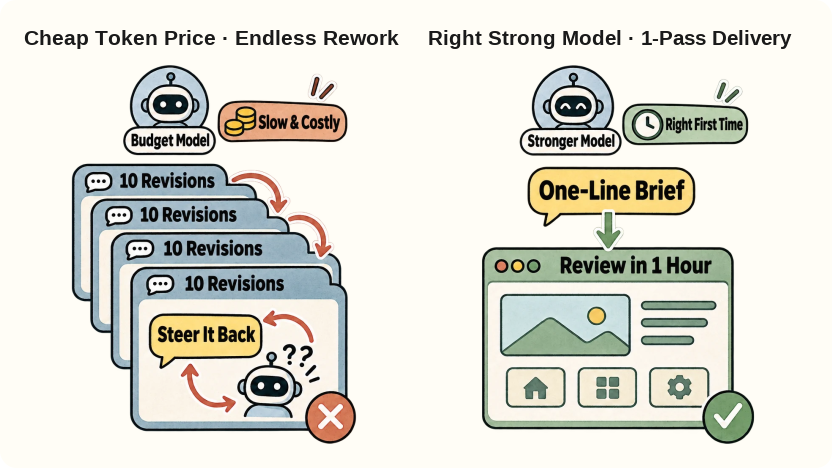
Some models look cheap per token, yet getting a real feature finished takes round after round of back-and-forth hand-holding and repeated fixes.
Other models cost more per token, yet you drop in one clear prompt, come back an hour later, and accept the result. Pairing the right model to the right type of work consistently wins on real-world value.
2. Understand Subscription Leverage & Channel Tradeoffs
In my own setup, I subscribe directly to three major US providers: Claude, Gemini, and Codex. Four realities drive that choice:
First: US first-party subscriptions currently offer much higher quota leverage than Chinese plans
Among mainstream Chinese models—DeepSeek, Kimi, and GLM—DeepSeek doesn't offer a monthly subscription plan; Kimi's plan leverage is low (the same budget buys far more usable tokens on US first-party subscriptions); and GLM hasn't released a fresh model in too long to match current DeepSeek or Kimi on capability and value.
Second: First-party subscriptions beat third-party wrappers
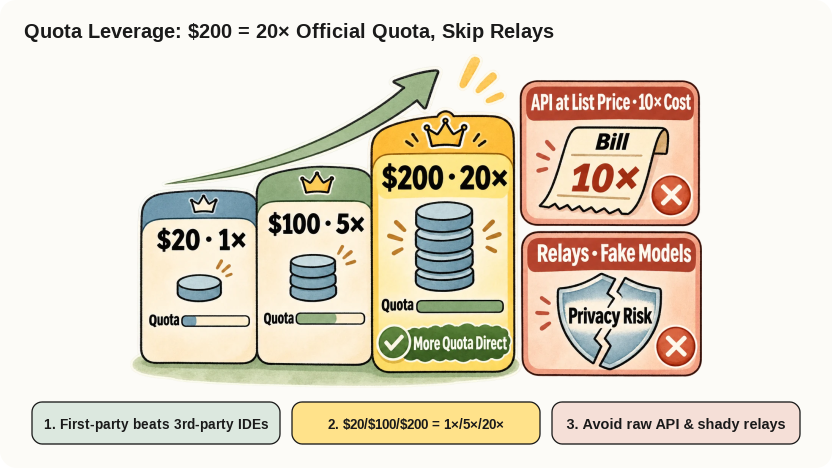
Subscribing directly to the model maker almost always yields higher quota per dollar because they're serving their own models. Want GPT models? Official Codex (via ChatGPT membership) gives vastly more quota per dollar than buying GPT usage through Cursor or another third-party IDE.
Third: Among $20 / $100 / $200 tiers, the top tier has the highest unit leverage
All three US vendors follow $20, $100, and $200 monthly tiers. Every tier is a good deal, and unit value scales sharply: if $20 is 1× quota, $100 is 5×, and $200 is 20×. Most non-coders won't burn through $200 right away, though usage tends to climb fast once AI becomes central to your daily workflow.
Fourth: Raw official APIs cost 10–20× more, and third-party relays carry quality & privacy risks
Paying raw list API rates for heavy coding runs 10× to 20× higher than official subscriptions (see Choosing an AI Agent & Environment Setup for setup details). Meanwhile, unofficial third-party API relays risk quiet model downgrades, privacy leaks, and extra proxy latency.
Honest Strengths & Blind Spots of Claude, Gemini, and Codex
Based on my daily usage today, Claude ranks #1, Gemini #2, and Codex #3.
1. Where Claude and Gemini Shine
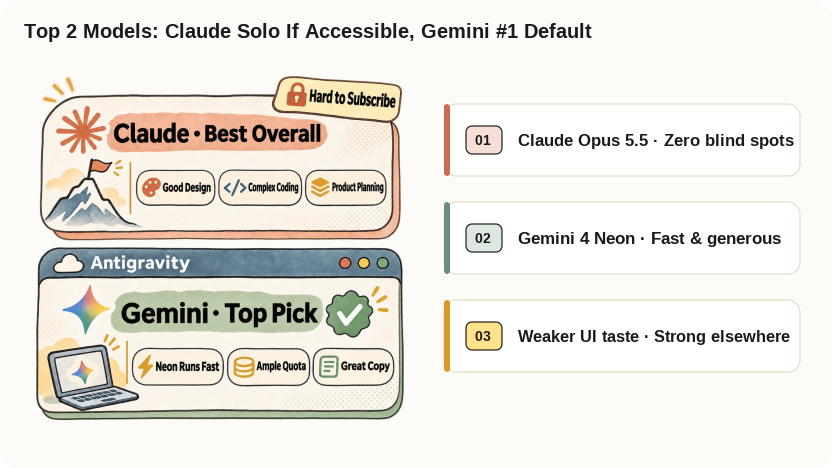
If you can subscribe to Claude, Claude alone can handle everything. Claude Opus 5.5 is the strongest all-rounder available right now with virtually zero blind spots—UI taste, coding, conversational feel, product design, planning, even video workflows—paired with generous subscription quota.
Because Claude is harder to purchase for many users, my #1 recommendation right now is a Gemini subscription (which I run primarily inside Google's AI coding tool Antigravity).
Gemini combines strong all-around ability with a low signup barrier. Among the recent Gemini 4 lineup, Gemini 4 Neon is fast, well-rounded, easy to converse with, and generous on quota. Its only weak spot is native UI visual taste—for almost every other daily task, it holds up well.
2. Being Realistic About Codex
As for #3, Codex (the GPT family), relying on it alone today makes producing great work much harder—the communication friction is far higher than with Gemini or Claude.
GPT models have stiff conversational flow, weak copywriting, and underwhelming open-ended research. Ask it to scout tasteful overseas UI references or draft an international growth plan, and the gap against Claude and Gemini is obvious.
Defenders often claim GPT matches Opus and Gemini—especially on hard bugs or research—and blame critics for "lazy one-line wishful prompts."
My response is simple: if another model already gets what I mean from one clear sentence, why should I write a multi-paragraph spec just to work around a stubborn model? Understanding high-level intent and asking clarifying questions when needed is intelligence. Going off in the wrong direction silently isn't user error—if I'm paying the same subscription fee, I'll pick the model that actually works better.
GPT (GPT-5.6 ~ 6.2) also tends to tunnel-vision. When iterating on a reusable Skill (see How to Build a Useful Skill from Scratch), Codex rarely steps back to fix the underlying principle—it patches the single symptom right in front of its nose:
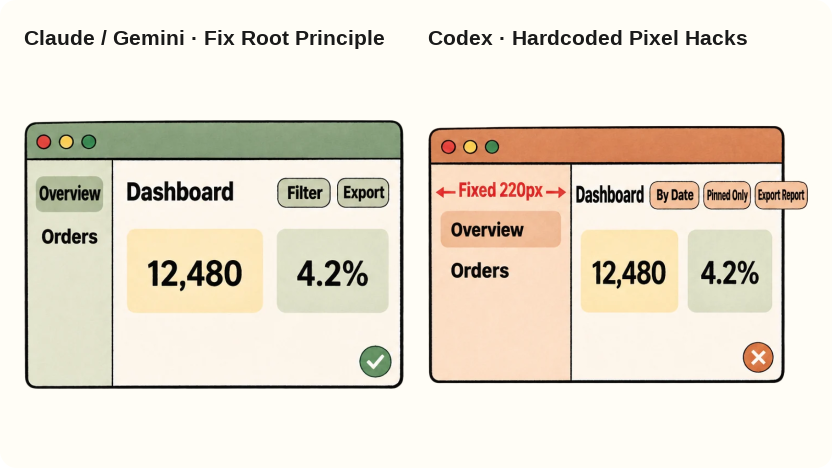
- Claude / Gemini's principle-level fix: Spots the root cause ("card density and whitespace weren't bounded") and updates the general rule—max 2 short header actions, drop secondary captions—solving the entire class of bugs at once.
- Codex's tunnel-vision patch: Hardcodes
"top-right toggle font-size <= 12px, min-width 96px, white-space: nowrap"directly intoSKILL.md. On the next page, the left sidebar overflows, so it adds"sidebar fixed 220px"—after five rounds,SKILL.mdis littered with brittle page-specific pixel hacks.
On complex apps, leaving GPT unsupervised also breeds over-engineered, patch-heavy code. Its rigor is genuinely great for chasing gnarly bugs—it reads every spec, traces long paths, and runs tests thoroughly. Applied to ordinary business features, though, that same rigor turns simple code slow and bloated.
So where does GPT fit? Beyond hard bug investigation, GPT-6.2 Sol in Codex is affordable and has excellent long-horizon instruction following—even across repeated context compactions in long threads, it keeps track of business constraints accurately. Once you hand it a clear direction, it works well as an execution Agent for concrete coding or directed research.
Bottom line: unless you're doing math or scientific research, don't blame yourself if GPT feels clunky for general building—put it strictly in directed execution and tough debugging roles.
Subscription Combos by Budget
1. Four Recommended Setups
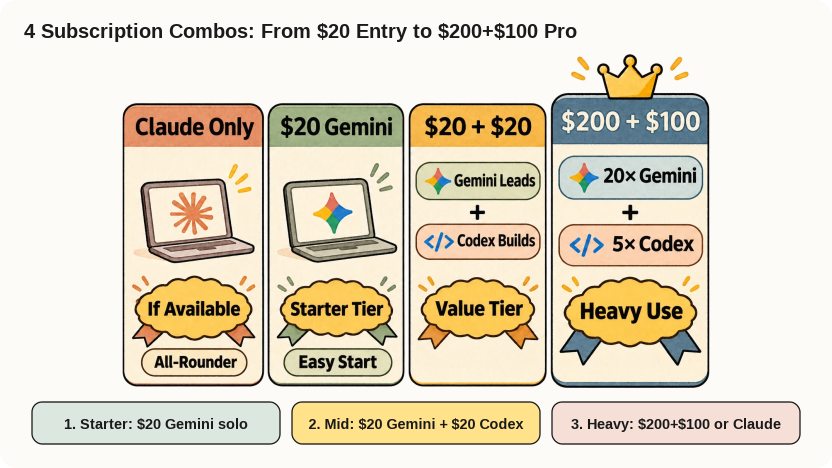
- If you can subscribe to Claude: Claude solo
Pick
$20,$100, or$200based on volume—Claude Opus 5.5covers everything cleanly. - Getting started or light daily use:
$20Gemini solo Low barrier, smooth conversation and coding withGemini 4 Neoninside Antigravity; upgrade later if usage grows. - Intermediate dual-model setup:
$20 Gemini + $20 Codex($40/month) Use Gemini as your main Agent for brainstorming, planning, and copy; delegate clearly scoped coding and research tasks to Codex (GPT-6.2 Sol). - Heavy daily usage:
$200 Gemini + $100 Codex($300/month) When Claude isn't accessible, this is my top heavy-duty pairing—20× Gemini leverage for high-volume daily building, plus$100Codex for heavy execution and complex bug triage.
2. Linking Both Models Smoothly with oil-delegate
You never need to copy-paste between two windows.
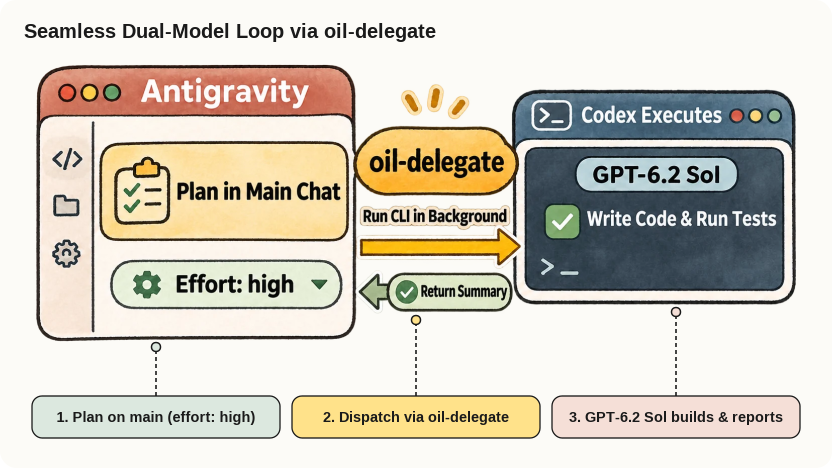
I use my open-source Skill oil-delegate (also bundled in oil-dev-skills). With codex installed and signed in locally, install oil-delegate inside Antigravity so your main Agent dispatches background Codex runs directly (see How to Use Subagents Effectively and Managing Long-Running Complex Projects with AI).

Once you lock a plan with Gemini in Antigravity, just say: