
Hey everyone, I'm Oil. This guide walks through writing your first Skill from scratch—and polishing a rough local draft into a product-grade Skill anyone can install and run reliably.
In What Are Skills? A Practical Guide, we unpacked the folder structure and progressive loading behind Skills. Creating one has a surprisingly low barrier—and a Skill tailored to your own real workflow almost always outperforms generic downloads.
Building Your First Skill from Scratch
When Is Something Worth Turning into a Skill?
I apply a simple two-part test:
- You repeat it yourself (a fixed daily or weekly workflow), or
- It is worth sharing with others who face the exact same problem.
Not sure what you repeat most? Have your Agent scan the last few weeks of your local chat history and surface recurring workflows ripe for packaging.
The Real Four-Step Creation Flow
You don't need to hand-write SKILL.md from scratch or memorize its spec—let your Agent build it across four steps:
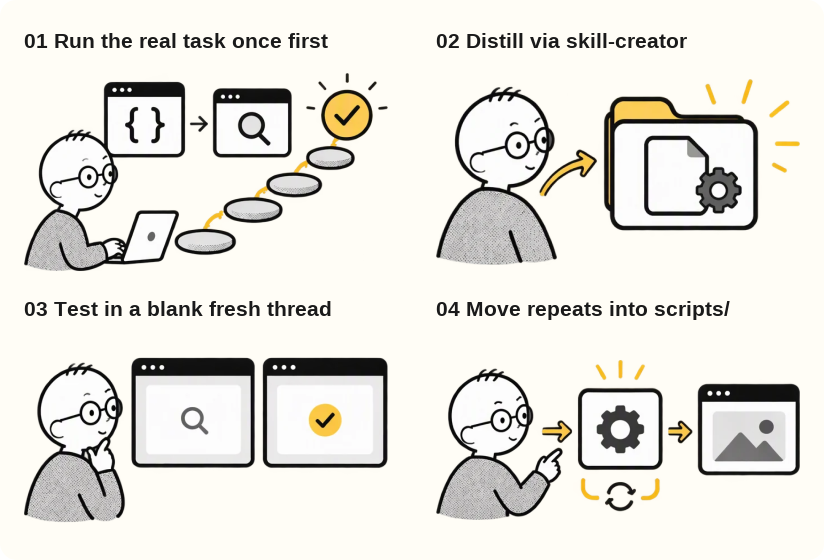
Step 1: Actually Run the Task End to End First
Never invent rules in a vacuum. Run the real task with your Agent without a Skill—build an actual deck or ship a real UI redesign—correcting mistakes along the way so every real pitfall surfaces naturally.
Step 2: Have Your Agent Distill the Run via skill-creator
Right inside that same thread once the task succeeds, ask the Agent to reflect on the workflow and package it using skill-creator. Note that built-in skill-creator skills vary by tool—Codex's focuses on directory structure, progressive loading, and init scripts; Claude's also walks through evaluation and A/B testing; other tools ship minimal versions or none at all (you can install my open-source oil-skill-creator below either way):
Step 3: Test in a Fresh Thread with Zero Prior History
Always test your new Skill in a brand-new conversation with zero history.
Inside the old thread, the Agent already remembered all your earlier preferences and hints. A blank thread proves whether the Skill stands on its own. If anything falls short, fix the Skill itself—never patch it in chat—and re-test cleanly.
For subjective Skills (writing, UI design), spin up two clean parallel subagents for blind A/B comparison:
Tell the main Agent what won and why, refine the Skill, and repeat until the Skill-enabled subagent wins consistently on the first try.
Step 4: Script Every Repeatable Step Inside scripts/
Anything deterministic and repetitive belongs in a script—not prose.
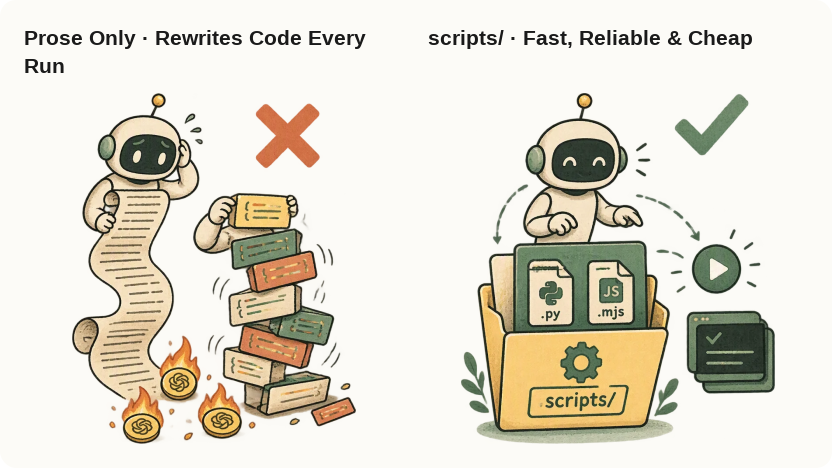
Browser automation, multi-platform publishing, or cover generation shouldn't be recoded from scratch on every run. In Oil UI, scripts handle assembling comparison pages and capturing verification screenshots deterministically—leaving the Agent free for creative judgment (and fallback fixes if a site changes):

Productizing a Skill So Others Can Use It Too
After building over a dozen Skills, here are the core lessons for turning a local draft into something others can use reliably:
1. Split Audiences: SKILL.md for Agents, README.md for Humans
SKILL.md is strictly for the Agent. Put human-facing demos, screenshots, and install guides in README.md so they never bloat model context. Keep SKILL.md lean, and leave thoughtful room on open-ended creative tasks rather than over-constraining every word.
2. Four Productization Upgrades
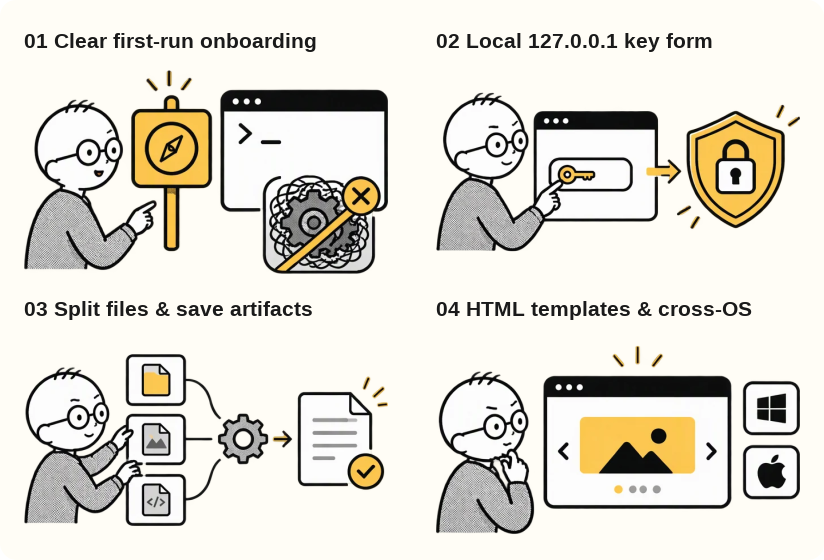
① Clean First-Run Onboarding (Keep Models Out of Script Source)
When a script fails on a new user's machine due to missing tools or keys, have the script print crisp setup guidance directly—so weaker models tell the user how to configure it instead of digging through script source in scripts/.
② Never Ask Users to Paste API Keys into Chat
Pasting plaintext keys into chat exposes them to third-party relay logs and risks committing secrets to GitHub. Instead, launch a tiny local page on 127.0.0.1 (stays strictly on the user's own machine) that saves keys directly into the OS keychain (macOS Keychain / Windows Credential Manager) without ever touching Agent context, while storing non-sensitive preferences in a shared user config directory. (This local web form and OS keychain helper is already bundled in oil-skill-creator below, so you can reuse it directly instead of building it from scratch.)
③ Respect Weaker Models: Split Files & Keep Intermediate Artifacts
Frontier models power through 3,000-line monoliths; lighter models lose instructions and break tags. When building multi-slide HTML decks, generate each slide as its own file and assemble them with a script—resumable after network blips and easy to fix per page.
④ Ship Visual HTML Templates & Cross-Platform Scripts
Whenever humans need to review or tweak data (subtitles, style comparisons), ship a pre-built HTML template in assets/ populated by a script instead of having AI hand-code a UI every run. And handle macOS/Windows/Linux differences cleanly (e.g., never assume python exists everywhere—check python3 / py -3).
Summary
I packaged this entire creation, security, A/B evaluation, cross-platform audit, and monetization workflow into the open-source oil-skill-creator:
npx skills add oil-oil/oil-skill-creatorAsk your Agent to install it whenever you're ready to distill a proven workflow into your first Skill or audit an existing Skill for weak spots.