
Introduction
Hey everyone, I'm Oil. This guide shares how to use AI to build and maintain a complex, long-running software project without letting it fall apart.
Recently I built Oil Studio, a native macOS screen recording and video editing app, from scratch with AI. Multi-module software iterated over months behaves very differently from a weekend prototype: without deliberate guardrails, code and UI drift into chaos until every new feature feels like wading through mud.

Here's the exact playbook I use in sequence: upfront technical research and milestone slicing, daily multi-model collaboration across Claude and Codex, silent background automated testing with environment isolation, periodic repo governance and release safety, plus the open-source Skill suite I use to lock these habits into daily work.
Why Long-Running AI Projects Spiral Out of Control
In a long-running AI project, one reality sets in fast: you no longer know how most of the underlying code is implemented—you judge the product primarily by actually using it.
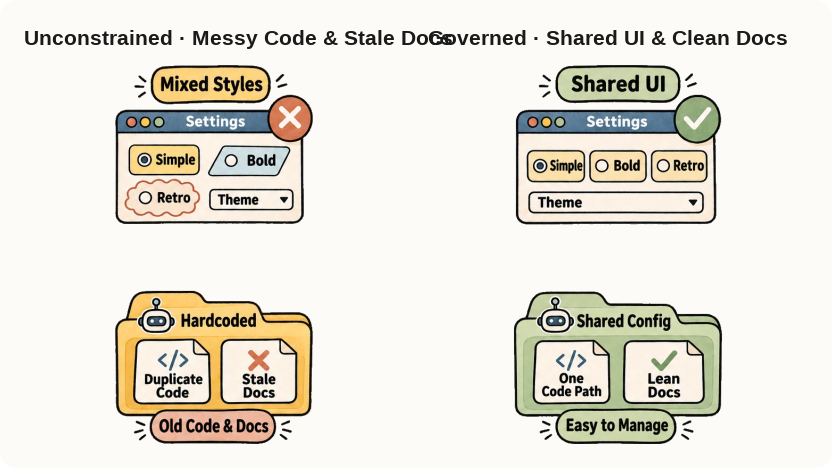
At current model capability, iterating continuously without strict constraints inevitably accumulates five kinds of mess:
1. Reinventing UI Styles Everywhere
In each fresh thread, AI focuses solely on shipping the immediate request. Without explicit component rules, it ignores existing UI components and re-implements slightly different styling and interactions in every screen—slowly eroding polish.
2. Scattered Hardcoding
Colors, spacing, config constants, and paths get hardcoded across unrelated files. Later, updating one rule leaves half the app out of sync.
3. Duplicated Logic
As the codebase grows without a clean module map, AI doesn't realize a helper already exists elsewhere and writes a second copy—turning future bug fixes into whack-a-mole.
4. Dead Code Left Behind
Across multiple iterations of a feature, AI writes the new approach and leaves abandoned helpers or files behind—wasting tokens and misleading future runs.
5. Bloated, Stale Documentation
AI loves writing design docs and notes. Left unpruned across iterations, old docs fall out of sync with real code—wasting tokens and actively steering future Agents in the wrong direction.
Keeping a long-lived repo healthy takes discipline both at project kickoff and throughout ongoing iteration.
Upfront Research & Milestone Slicing
Before writing product code, I run open-source and language research, multi-model cross-checks, and milestone slicing.
1. Evaluating Open-Source Reuse vs. Native Language Choice
At project kickoff, I always have AI deeply research mainstream frameworks on ecosystem, maintainability, and performance ceiling.
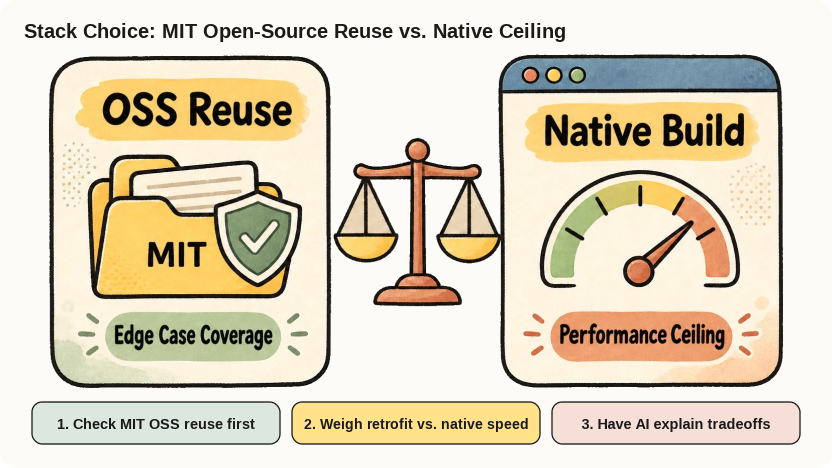
For Oil Studio, I checked existing open-source projects first: what stack do they use, and can I build on one?
One often-missed point: permissive licenses like MIT (or Apache 2.0) let you modify and commercialize freely with attribution—just steer clear of copyleft licenses like GPL or AGPL if you're building closed commercial software. If a solid battle-tested MIT repo exists, I never reinvent the wheel—while weighing how hard it is to adapt versus building cleanly from scratch.
AI makes starting clean tempting, yet mature open-source repos carry years of hard-won fixes for obscure edge-case bugs that look counterintuitive to an AI but silently keep production stable.
I ultimately chose native Swift (Apple's native macOS/iOS language with direct access to system graphics and media APIs) because every existing open-source alternative used cross-platform web wrappers like Electron or Tauri—and for macOS interaction polish and rendering speed, native Swift wins decisively.
Don't worry if you don't know the target language personally. I didn't know Swift well either; modern models know mainstream languages deeply. Just ask AI to explain the tradeoffs in plain language so you can make the strategic call:
2. Multi-Model Cross-Checks & Milestone Slicing
Never trust a single model on major architectural decisions.
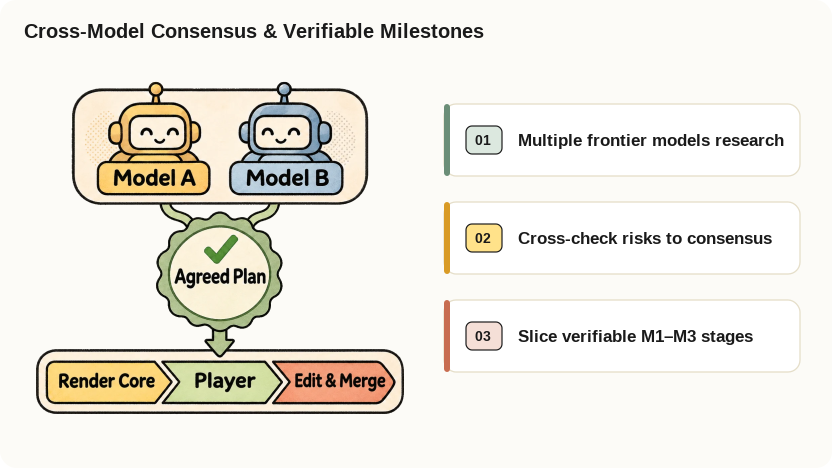
Strong frontier models carry broader real-world knowledge of known pitfalls. I feed major technical choices to multiple top models to verify consensus before committing.
Once the stack is locked, hand milestone planning to a strong planning model (like Gemini or Claude). On Oil Studio, Claude Opus 5.5 owned product design and milestone breakdown: