
Every time a major LLM drops, you hear claims that AI 3D modeling has gotten really good—generating WebGL scenes from a paragraph of text or scripting Blender head-to-toe. That works for quick demos, but what actually happens when you try to ship AI-made 3D assets inside a real product?
A while ago, when testing GPT-6 Astra, I had it procedurally model a 3D farming vocabulary game. For geometric low-poly props like wooden chairs, wells, and windmills, code-driven modeling held up fine. Recently, though, while building a real-time 3D virtual avatar feature for my macOS app Oil Studio, getting character heads to look good turned into a long chain of dead ends.

Quick context on why we built it: product demos and tutorials feel flat with only a screen and voiceover. Having a presenter in the corner nodding and gesturing adds warmth, yet plenty of creators avoid showing their real face due to privacy, camera shyness, or simply not wanting to get camera-ready at home. Earlier versions of Oil Studio used a 2D avatar cycling across four static images, which could not follow head turns or eye gaze. This time I wanted something closer to Apple Memoji—keeping the presenter's real body movements, erasing their real head and restoring the room background behind it, and replacing the head with a real-time 3D character that turns, blinks, and lip-syncs.
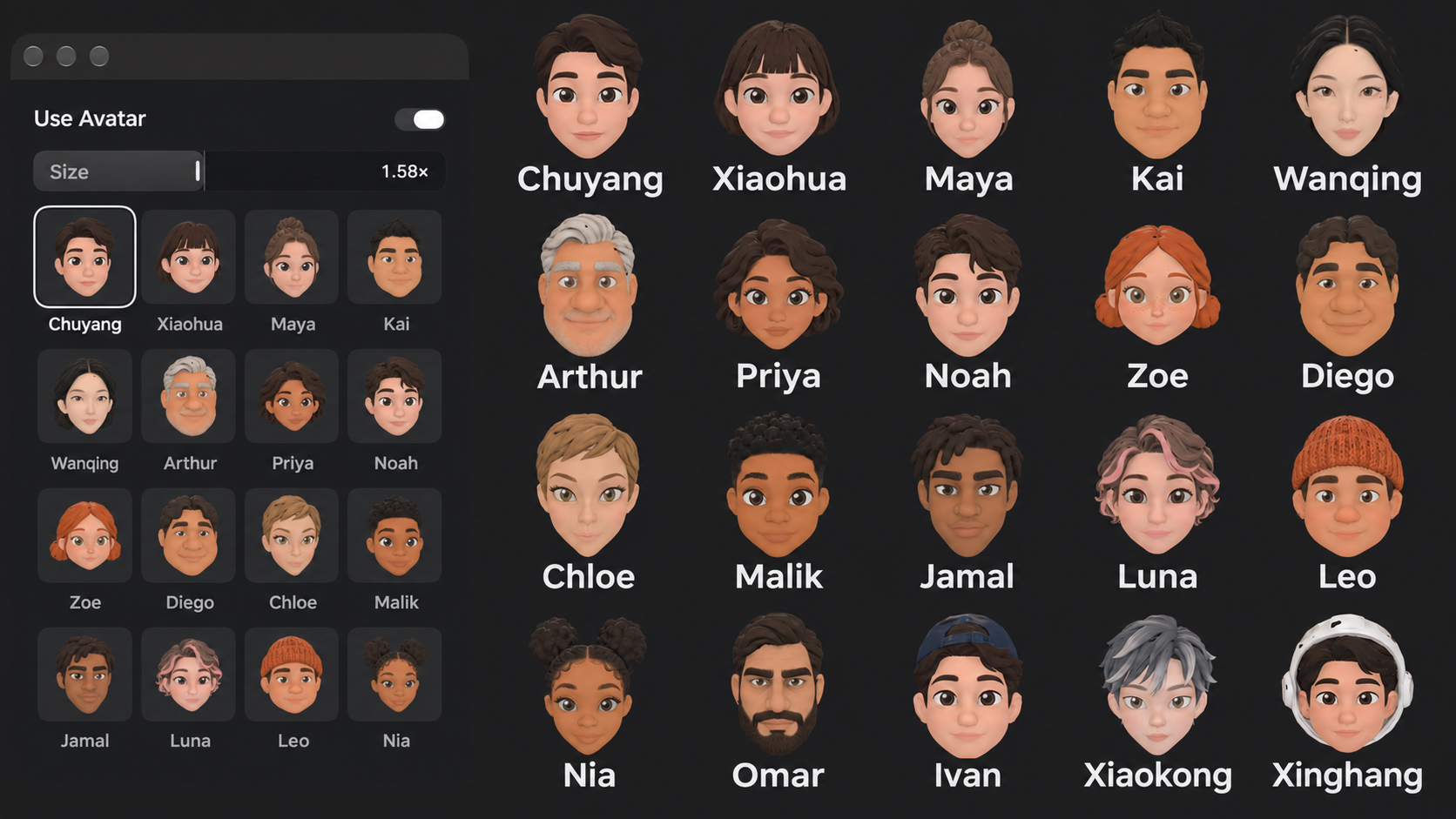
Above are the 20 original human characters that shipped in Oil Studio (plus one open-source raccoon, 21 built-in avatars total). Getting there forced a major pivot: I started by buying a commercial avatar pack and spent two days refining it with Claude 5.2 Fable and GPT-6.2 Astra—it never looked right. Switching to image-to-3D, Tripo 3D missed the mark before Meshy finally nailed the static look, which then exposed a new headache: generated meshes are notoriously hard to edit and rig. Here is the complete story.
Attempt 1: Buying a Commercial Pack and Tuning It With AI
Before building anything, I surveyed open-source models and commercial SDKs.
For natural facial tracking, a 3D head needs Apple's standard 52 ARKit blendshapes (separate weightable channels for left/right blinks, eyebrow raises, jaw open, cheek puff, and so on). Almost no free open-source character heads ship with all 52 channels—Google MediaPipe's sample only includes a single raccoon—and commercial avatar SDKs mostly rely on cloud or web runtimes that do not fit a fully local macOS desktop app.
So I bought a commercial 30-character 3D avatar pack (29 humans + 1 raccoon). It came with all 52 ARKit blendshapes, but inside Oil Studio's native renderer the raw assets looked rough: heavy clay-and-plastic shading, elongated faces, stiff hair chunks, harsh eye-socket and under-nose shadows—solidly in the uncanny valley.
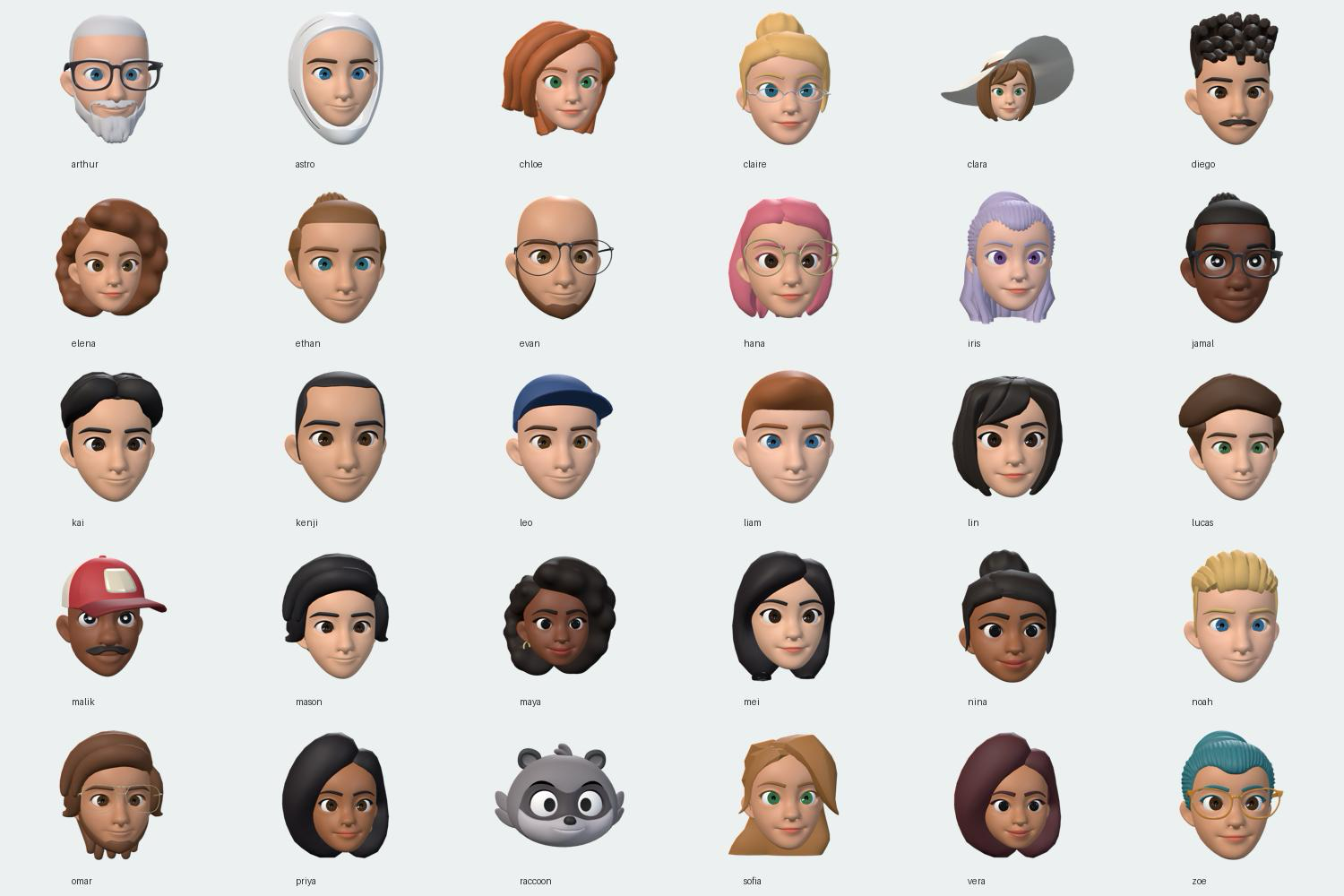
Rather than tossing the pack right away, I figured the toughest models available—Claude 5.2 Fable and GPT-6.2 Astra—could salvage the base meshes via Blender scripts and shader tweaks. Using "Claire" as our test subject, we iterated on:
- Face and hair proportions: shortening the chin, rounding the cheeks, merging intersecting hair chunks, and fitting floating eyeglasses snugly to the face.
- Nose sculpting (and reverting): trying a softer cartoon button nose, which looked fine head-on but stuck out like a pasted ball in profile—so we reverted all 29 human noses back to their original bridges.
- Softer lighting and irises: adding a softer portrait key light, warm-top/cool-bottom hemisphere fill to lift dark shadows, and repainted layered irises.
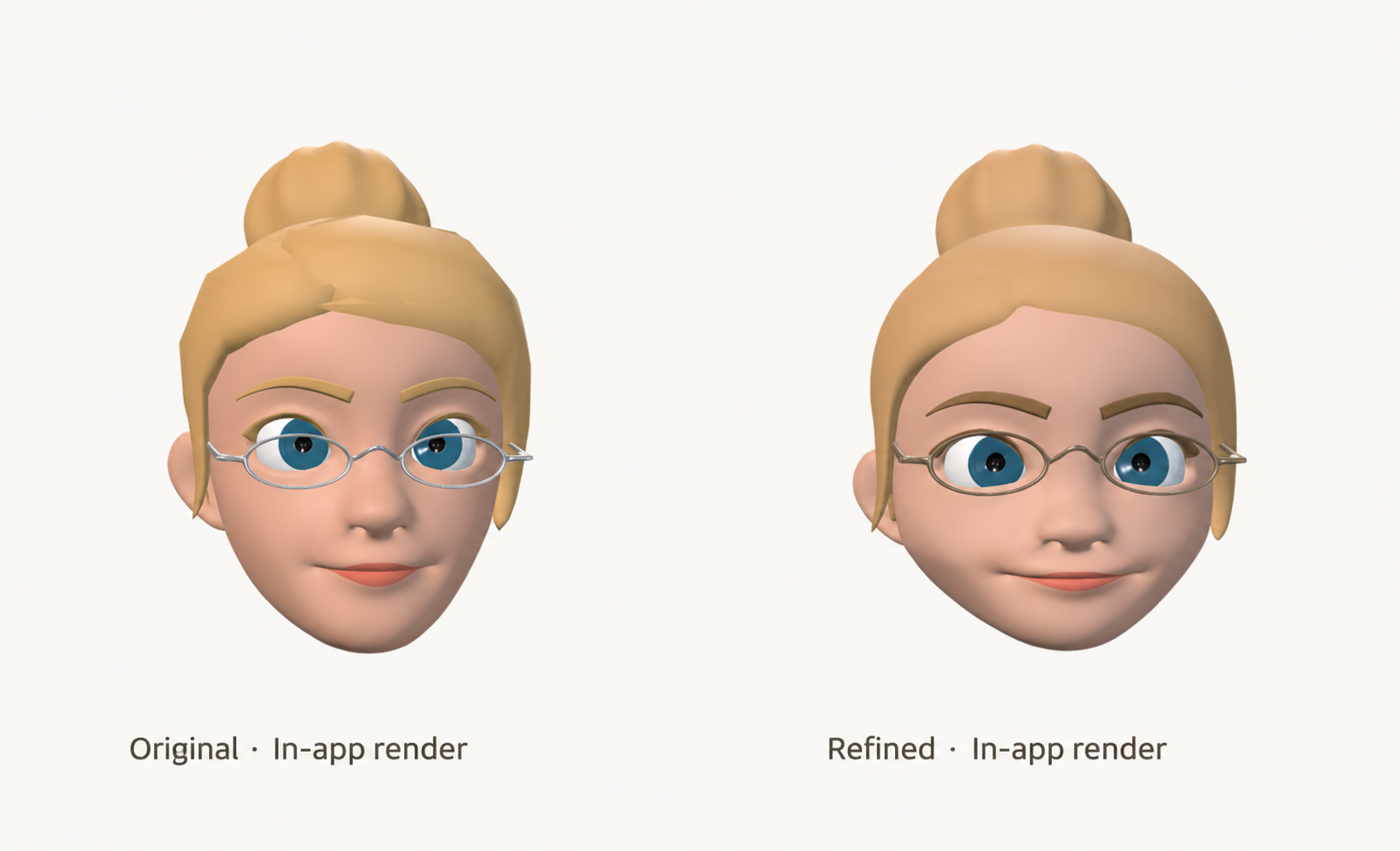
Two days of intermittent tuning still could not rescue it. Even on the right, with softer lighting and rounder cheeks, the underlying sculpt kept that stiff clay-mannequin feel.
Around the same time, I tested a second question: since we only had one open-source raccoon, could an LLM script Blender to build a Memoji-style fox head completely from scratch? Here is what came out—essentially spheres and cones glued together:
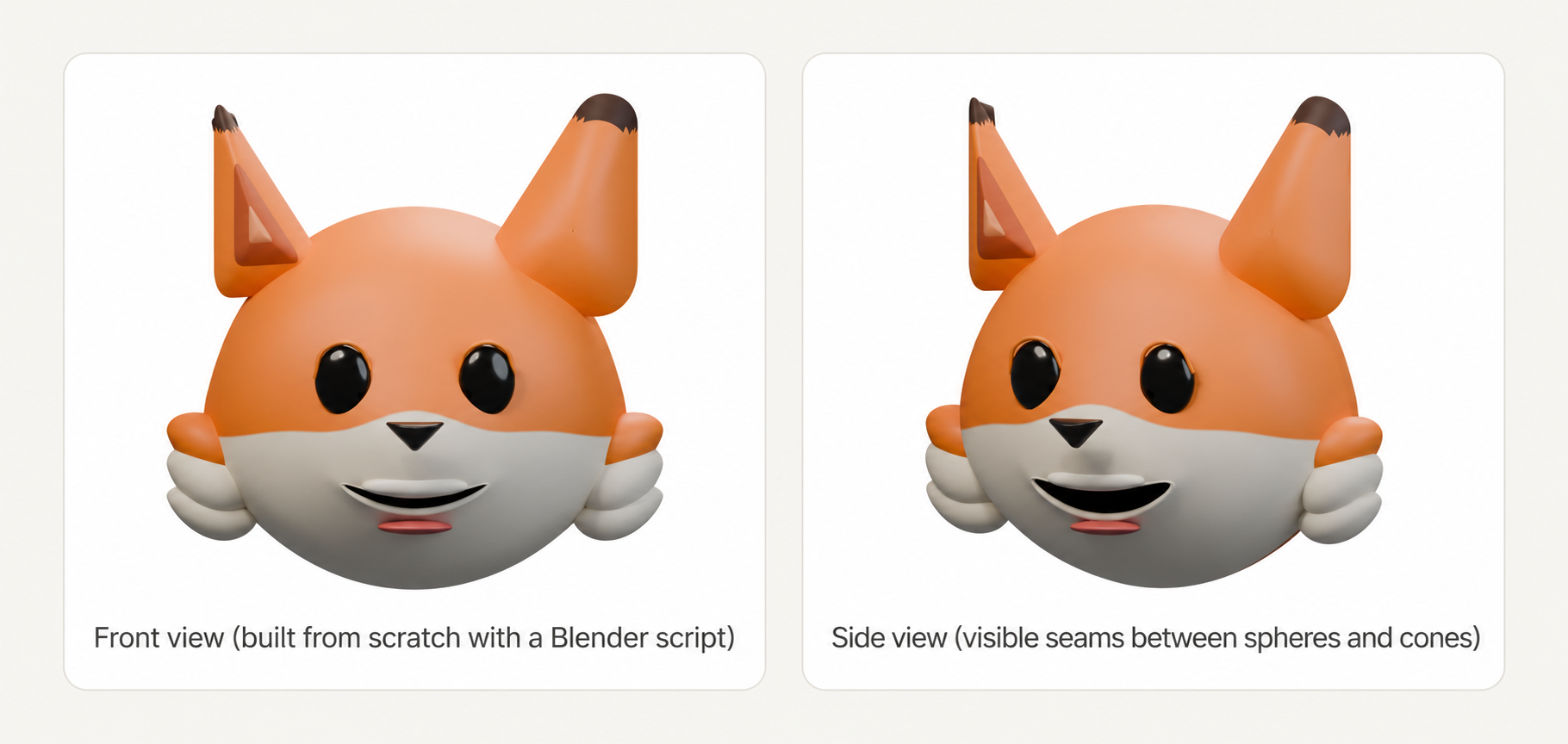
Those two experiments made the boundary unmistakable: today's LLMs still struggle to code expressive character heads from scratch—and even struggle to refine facial proportions on an existing 3D head. Procedural code works for geometric props, but human faces are unforgiving about millimeter-level curvature; manipulating vertices via math formulas does not give the model a reliable sense of what looks appealing.
Attempt 2: Image-to-3D (From Tripo to Meshy)
Dropping procedural sculpting, I switched to image-to-3D: generate clean front-facing 2D portraits first, then feed them to a specialized image-to-3D model.
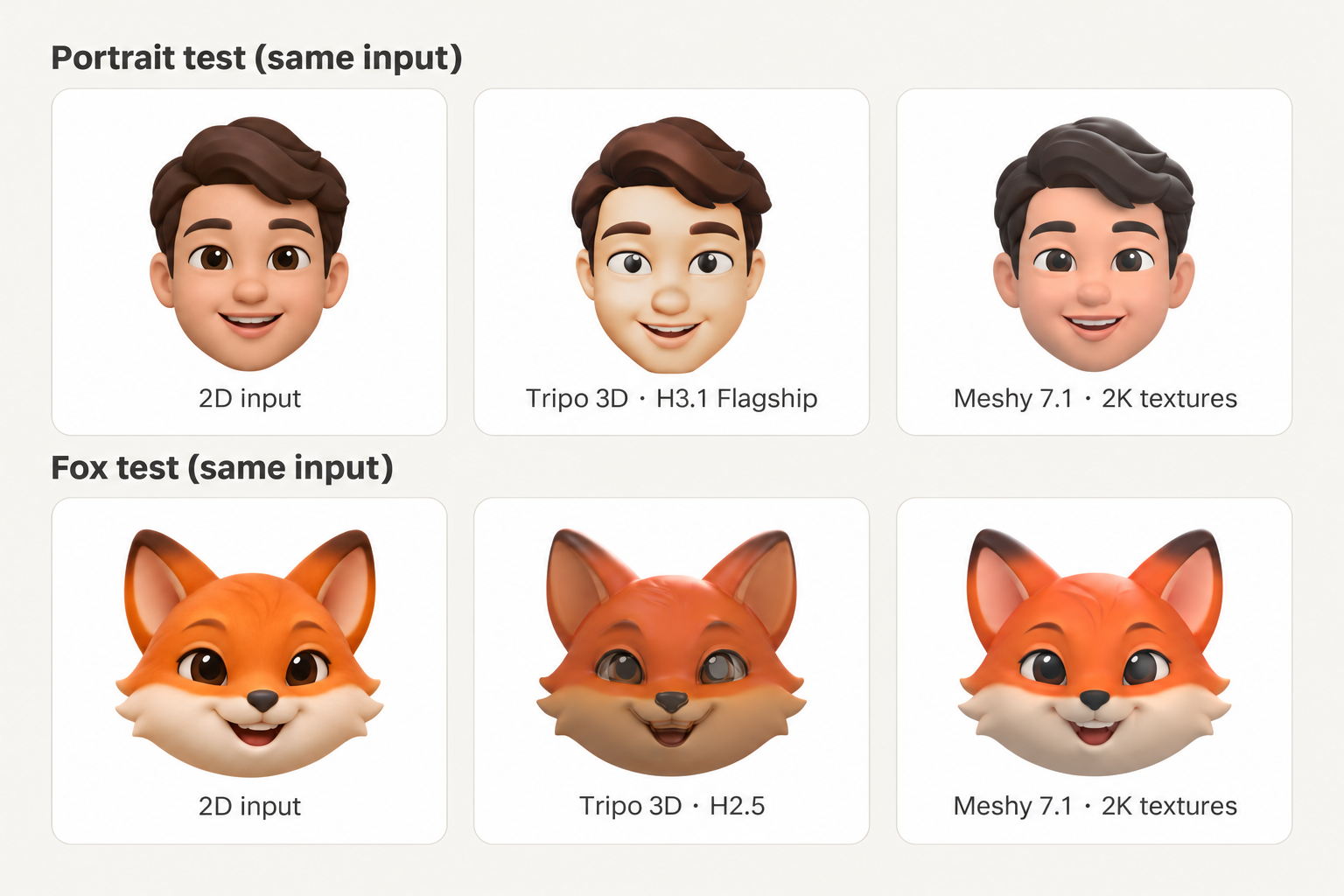
I started with Tripo 3D, testing a fox (H2.5) and a human portrait on its flagship H3.1 tier. The fox came out overly glossy with light forehead fur turned into carved grooves and messy eye borders. The human portrait was worse: large brown irises shrank noticeably, exposing too much sclera and creating a blank stare, while lighting and skin tone drifted far from the reference.
Running the exact same two 2D portraits through Meshy's flagship Meshy 7.1 (with 2K textures) preserved facial proportions, iris size, and soft surface quality far better:
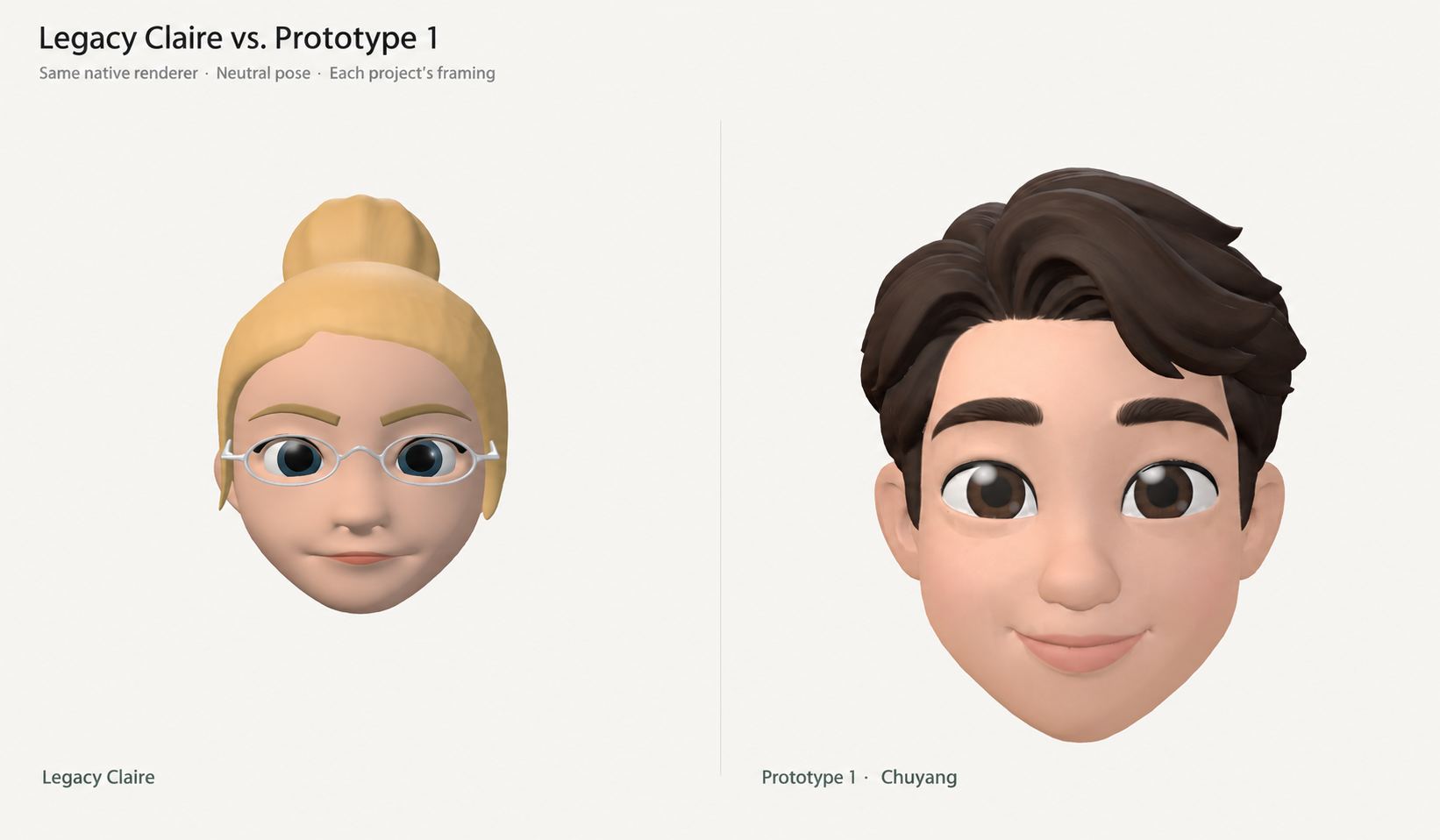
Putting our first Meshy human prototype ("Chuyang") into the exact same Oil Studio native renderer next to the two-day-tuned commercial Claire made the gap obvious—warmer proportions, cleaner silhouette, and no uncanny valley.
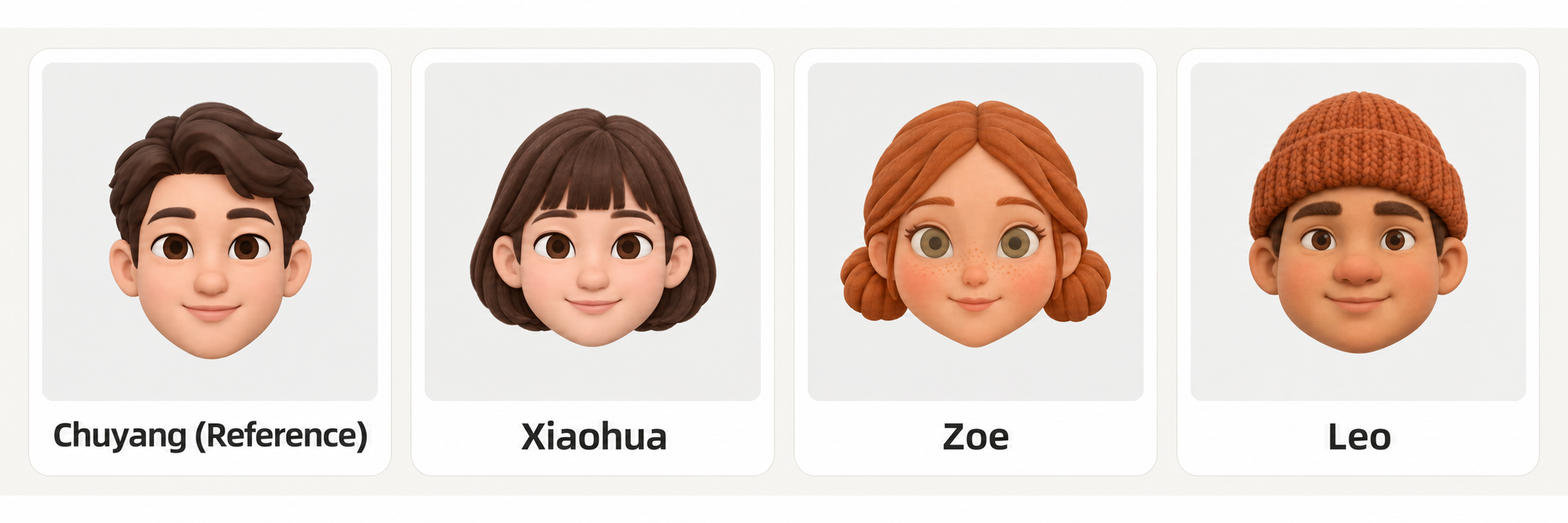
To batch-generate 30 cohesive characters without baking bad 2D lighting into 3D textures, we enforced four strict rules during 2D portrait generation:
- One style anchor: lock "Chuyang" as the visual anchor and generate all other characters via image-to-image variants rather than blind text prompts.
- Flat front lighting, zero painted eye catchlights: earlier Tripo and Meshy tests baked white 2D specular dots straight into the 3D albedo texture. For production, we enforced even front lighting with no white catchlights painted on the pupils and no heavy side shadows.
- Clean jawline cutoff: end cleanly below the chin with no neck or collar, simplifying head-pivot alignment later.
- Skip thin accessories: chunky hats and helmets convert cleanly, while thin eyeglasses or earrings fuse into eyelids and cheeks during image-to-3D reconstruction.
The Downside of Image-to-3D: Making Static Meshes Animatable
Image-to-3D nails rich static geometry, but comes with a glaring weakness: generated heads are hard to edit.
It mirrors 2D AI image generation: great at producing detailed bitmaps, poor at outputting clean editable vectors (SVG). Both Tripo and Meshy export one fused static mesh of hundreds of thousands of irregular triangles—irises are painted onto the face skin, there are no separate eyeballs or eyelids, the mouth is sealed shut, and zero blendshapes exist.
If you try to make that raw mesh blink or glance sideways by pulling face vertices directly, everything breaks: dragging upper eyelid skin stretches painted eyeliner into jagged vertical stripes, and shifting pupil vertices warps the surrounding eye whites.
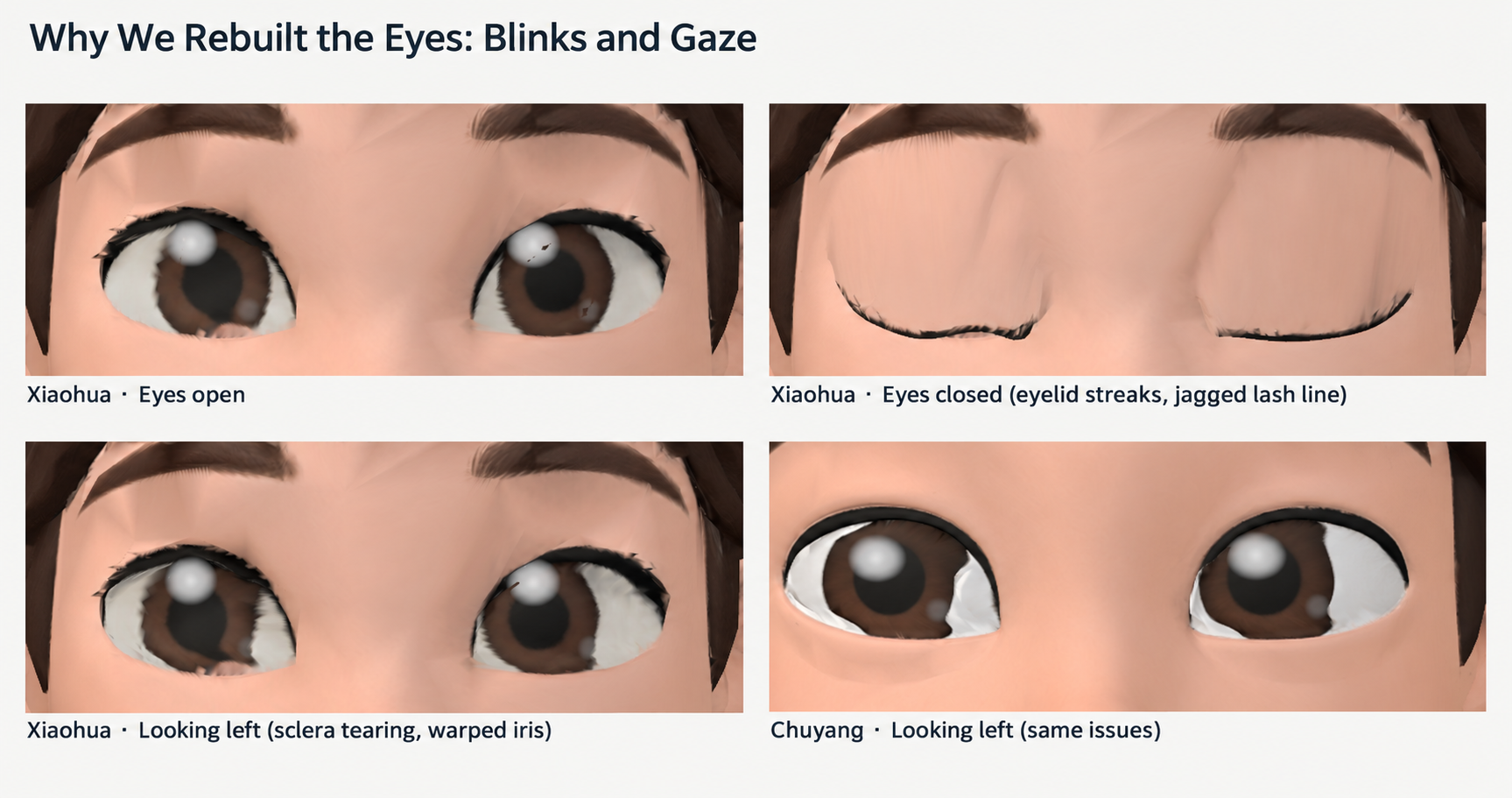
Once the static likeness was solved, the remaining work was pure geometry processing: adding articulated eyes, an inner mouth cavity, and 52 ARKit blendshapes without disturbing the neutral front look. That deterministic scripting work played directly to Claude (Claude Code) and Codex (GPT-6.2).
1. Rebuilding the Eye Socket to Eliminate Blink Artifacts
Eyes took the most iteration. Flat eye decals and rectangular socket cutouts both left visible shading seams where lighting didn't match the surrounding face.
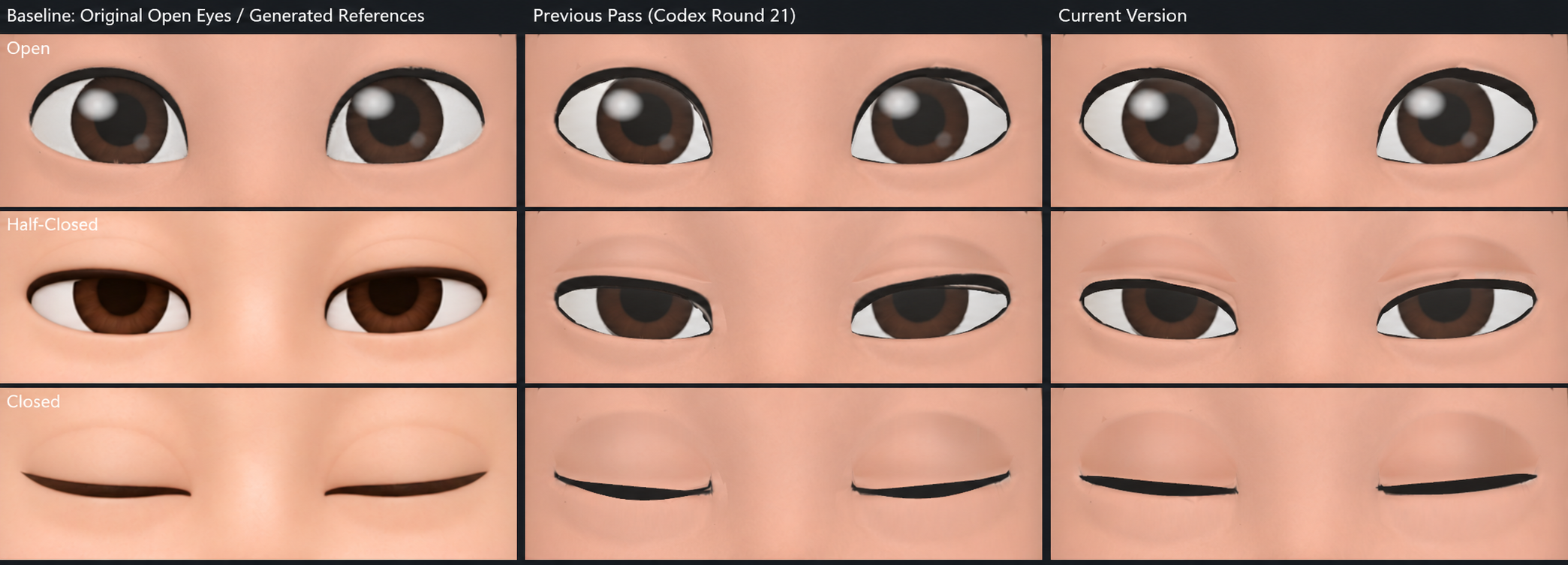
We switched to proper character topology around the eyes: cutting an opening, re-laying a clean concentric ring of polygons sharing outer boundary vertices and normals with the face (eliminating seams), and placing independent eyeballs behind them. Still, clean eyelids took over twenty passes—for the first 21 rounds in Blender, Codex left the original black eyeliner painted on the skin texture, which crushed into a jagged pixel line whenever the eyelid closed and made both eyes look uneven.
With Claude, we changed tactics: paint over the baked black eyeliner with matching skin tone, and add a dedicated 3D eyelash band attached to the upper lid edge that rotates concentrically around the eyeball center. Because concentric rotation keeps a constant clearance above the eyeball surface, blinking stops clipping and closes cleanly. Below: the AI blink reference on the left, round 21's crushed texture in the middle, and the independent eyelash band on the right:
After dialing in Chuyang, we avoided hand-editing 20 heads in Blender and wrote a reusable pipeline: render an orthographic front view of each head, automatically locate sclera, iris, and eyelid contours, project them back onto the 3D mesh, and rebuild the eyes. Batch-running all 20 human heads took about 10 minutes—18 passed on the first run, while heavy eyebrows on "Arthur" and bangs covering the eyes on "Xiaokong" only needed quick parameter tweaks. (Animal heads have completely different eye and snout topology, so the human detector did not apply; we kept the open-source raccoon for v1 and left additional animals for later.)
2. Cutting the Mouth and Generating All 52 Blendshapes
For the mouth, we sliced along the closed lip seam so the neutral mouth stays cleanly closed without a visible seam, hollowed a dark inner mouth bag behind the lips, and placed upper teeth and a tongue inside. To synthesize all 52 ARKit blendshapes, the script locates mouth corners, lips, cheeks, brows, and jaw pivot, then applies smooth falloff deformations (jaw rotating downward around the ear axis, smile lifting mouth corners and cheeks, plus brow, cheek, and lip shapes).
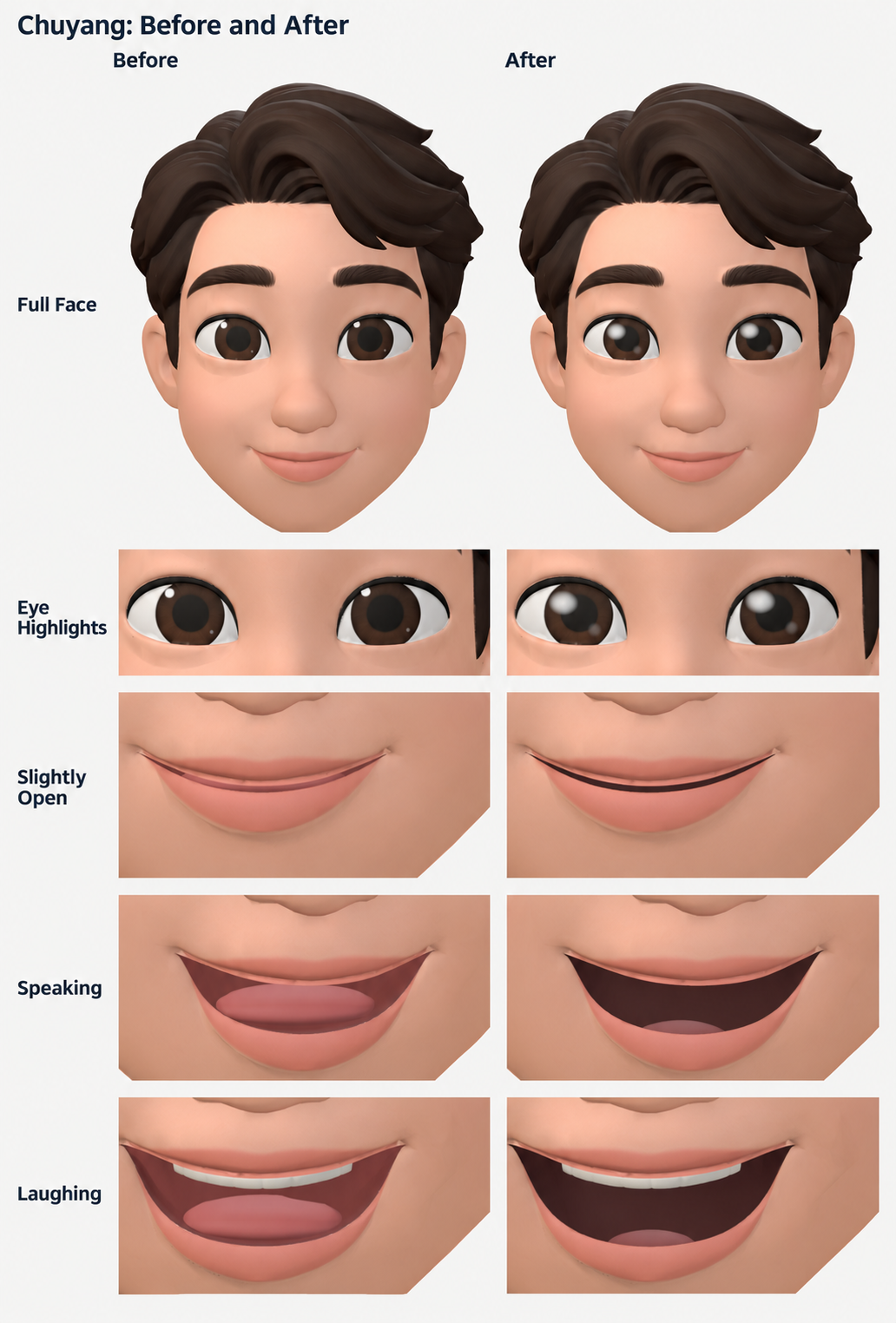
The first animated test exposed two awkward spots: eye highlights were either invisible or looked like harsh painted white dots that vanished the moment the lid lowered; and because a front camera looks slightly downward over the lower lip, a shallow mouth cavity made a bright pink tongue fill the opening on even tiny speech movements.
We added a thin transparent cornea shell with a soft window-shaped reflection spanning ~30% of the iris width that scales down as the lid closes and partially tracks head turns, then deepened the mouth cavity and darkened/recessed the tongue so gentle speech reveals a natural dark interior while wide smiles show upper teeth and a hint of tongue.
To keep installer size modest and frame rates locked, we also decimated each raw multi-hundred-thousand-triangle head down to ~20–30k triangles and added an automatic texture infill pass to patch tiny dark pinholes occasionally created in hair crevices during re-baking.
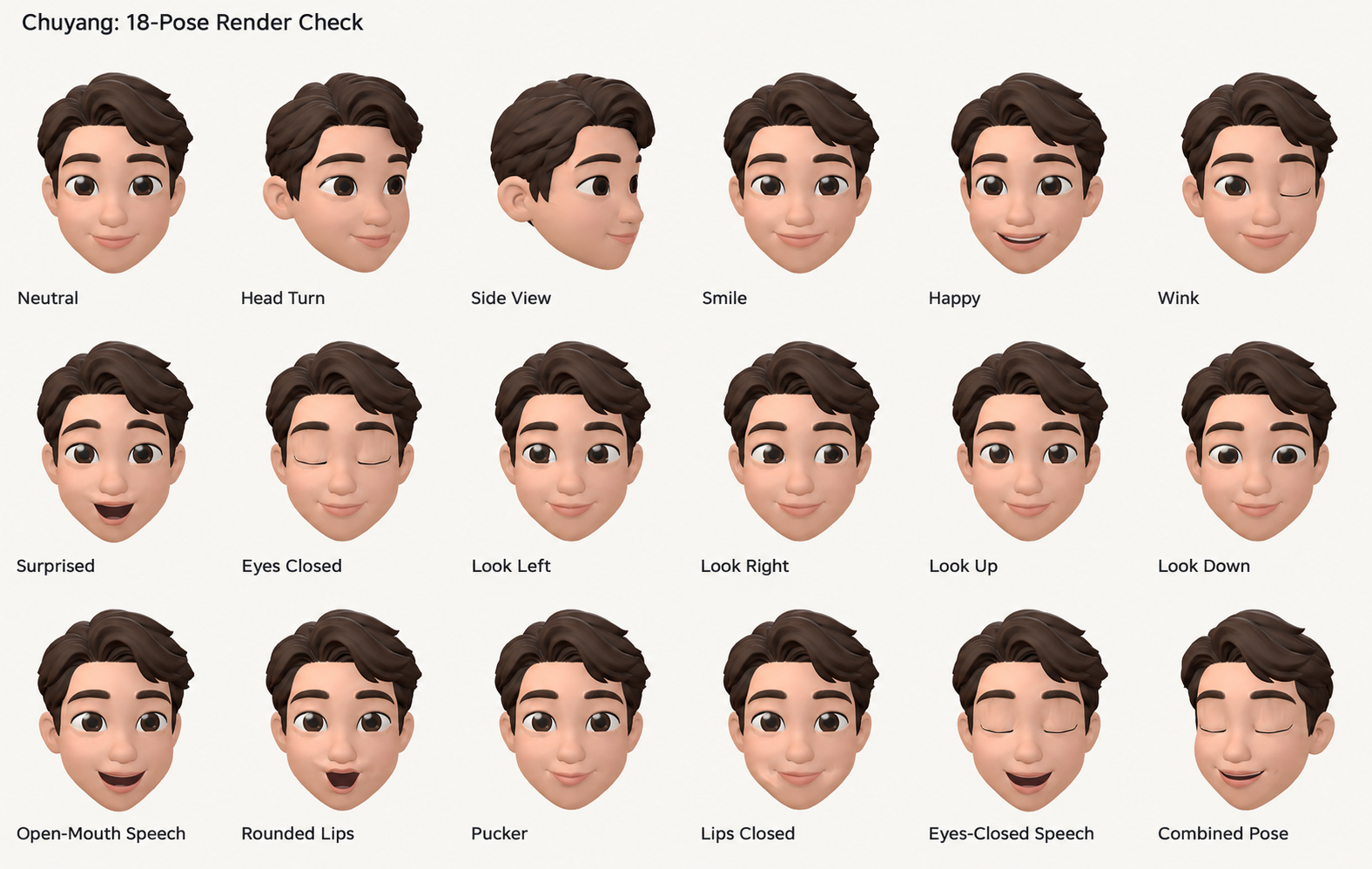
One nasty pipeline bug underscored why visual checks matter: during one Blender export pass, the script double-applied displacement offsets across a dozen eye-gaze and squint channels. Every unit test and file-format check passed—only inspecting rendered frames revealed the eye mesh tearing apart when glancing sideways. From then on, every change exported an 18-pose contact sheet plus frame-by-frame playback driven by two 90-second real talking-head clips before anything was checked in.
Putting It on Camera: Real-Head Erasure and Privacy
Finishing the 3D head was only half the product. On a live webcam feed, simply floating a 3D head over your face fails the moment you tilt or shrink the avatar—real hair, ears, or chin peek out behind it.
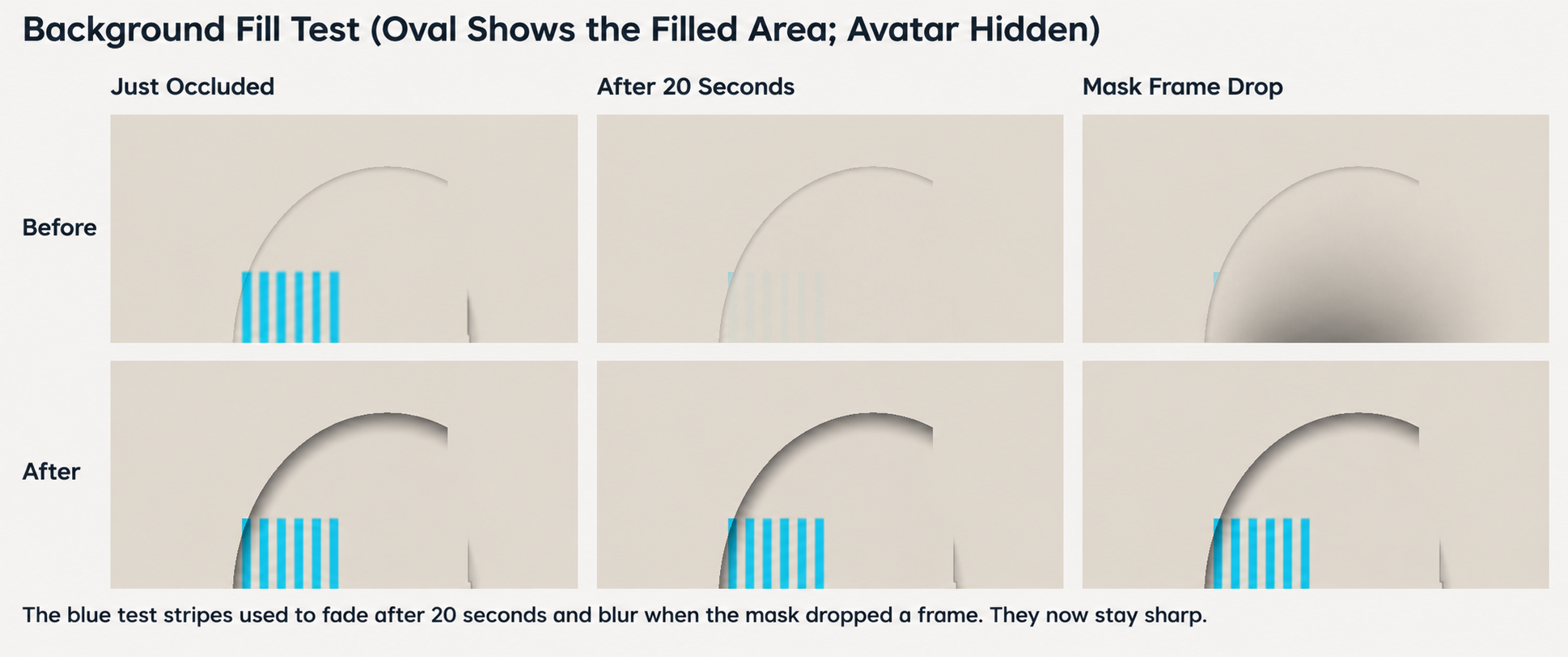
Without forcing a green screen or virtual background, Oil Studio watches tiny natural head movements to learn the wall and furniture behind you, then erases your real head and fills the gap from that background memory. Our first version cached background memory at low resolution (384×216) and faded out after ~9 seconds of occlusion, turning striped walls or curtain rods into a smudged patch.
We raised the background cache resolution, extended retention past 90 seconds, added ambient exposure tracking, and carried forward the previous silhouette across brief segmentation dropouts. In the composite test below (with the foreground avatar hidden to expose the elliptical erasure zone), blue wall stripes remain crisp even after 20+ seconds of occlusion or a dropped segmentation frame:
To prevent accidental face leaks, whenever Avatar Mode is active—during model startup, after stepping away from the camera, or when temporarily hiding the avatar—the webcam slot displays a solid dark-gray placeholder instead of flashing the raw camera frame.
Summary
Back to the opening question—how good is AI 3D modeling for real shipping software? Three takeaways from this build:
- LLM code modeling works for simple props, not character heads: geometric items like benches and wells work fine via scripts, but expressive faces are too sensitive to subtle proportions. Even Claude 5.2 Fable and GPT-6.2 Astra could not sculpt a good character from scratch or rescue an uncanny commercial mesh. Right now, "flat-lit 2D portrait + image-to-3D" is the viable path—and platform quality varies sharply (Meshy 7.1 beat Tripo 3D clearly on facial proportions here).
- Bridge image-to-3D's editability gap with deterministic geometry scripts: image-to-3D outputs a sealed static mesh—like an AI raster image instead of an SVG. Turning eye socket re-topology, independent eyelash bands, and mouth cavities into explicit geometric rules lets Claude and Codex batch-process dozens of heads reliably.
- Never trust passing tests alone on visual pipelines: unit tests and schema checks stayed green even when side-gaze tore the eye mesh or small speech flashed a bright pink tongue. Exporting automated multi-pose contact sheets and reviewing real renders every single round is non-negotiable.
The 3D virtual avatar feature is live in Oil Studio now (21 built-in characters, live preview while recording, swappable during post-recording editing, plus drag-and-drop support for external .glb models). If you record demos and prefer staying off camera, give it a try.