
Google unveiled Gemini 4 Argon at the end of September and rolled it out broadly on October 13. The follow-up cadence moved fast: the higher-tier Gemini 4 Carbon arrived at the end of October and hit general availability on November 10, followed closely by the speed-focused Gemini 4 Hydrogen on November 12.
Before diving into how they feel in real projects, here is the current official API pricing for all three models (each supports a 1M-token context window, and output pricing includes thinking tokens):
| Model | Input (per 1M tokens) | Output (per 1M tokens) | Notes |
|---|---|---|---|
| Gemini 4 Carbon | $2.00 ($4.00 starting Dec 1) |
$10.00 ($20.00 starting Dec 1) |
Half-price launch window through end of Nov; no free tier |
| Gemini 4 Argon | $2.00 ($4.00 starting Dec 1) |
$10.00 ($20.00 starting Dec 1) |
Same list price as Carbon; slightly fewer thinking tokens per turn |
| Gemini 4 Hydrogen | $1.50 |
$7.50 |
Flat rate across full context; includes a free tier |
Carbon and Argon share the exact same list price, and once standard pricing kicks in on December 1, heavy coding via direct API billing is not cheap. Since Argon went GA, I have been running Google's AI coding client Antigravity on the $200 subscription plan every day. Below are my practical notes on how the three models differ, how they stack up against Claude and GPT, three tweaks that noticeably improve the experience, and where I recommend using them right now.
Model Tiers and Quota Experience
Ordered from strongest to lightest, the Gemini 4 lineup runs Gemini 4 Carbon, Gemini 4 Argon, and Gemini 4 Hydrogen.
Carbon vs. Argon: Smaller Gap Than Expected, Generous Quotas
For the first few weeks before Carbon launched, Argon was my daily driver. The $200 plan comes with generous quota: even under heavy development paired with external Codex code reviews, I still had to look for extra tasks near the end of each week to burn through the remaining allowance.
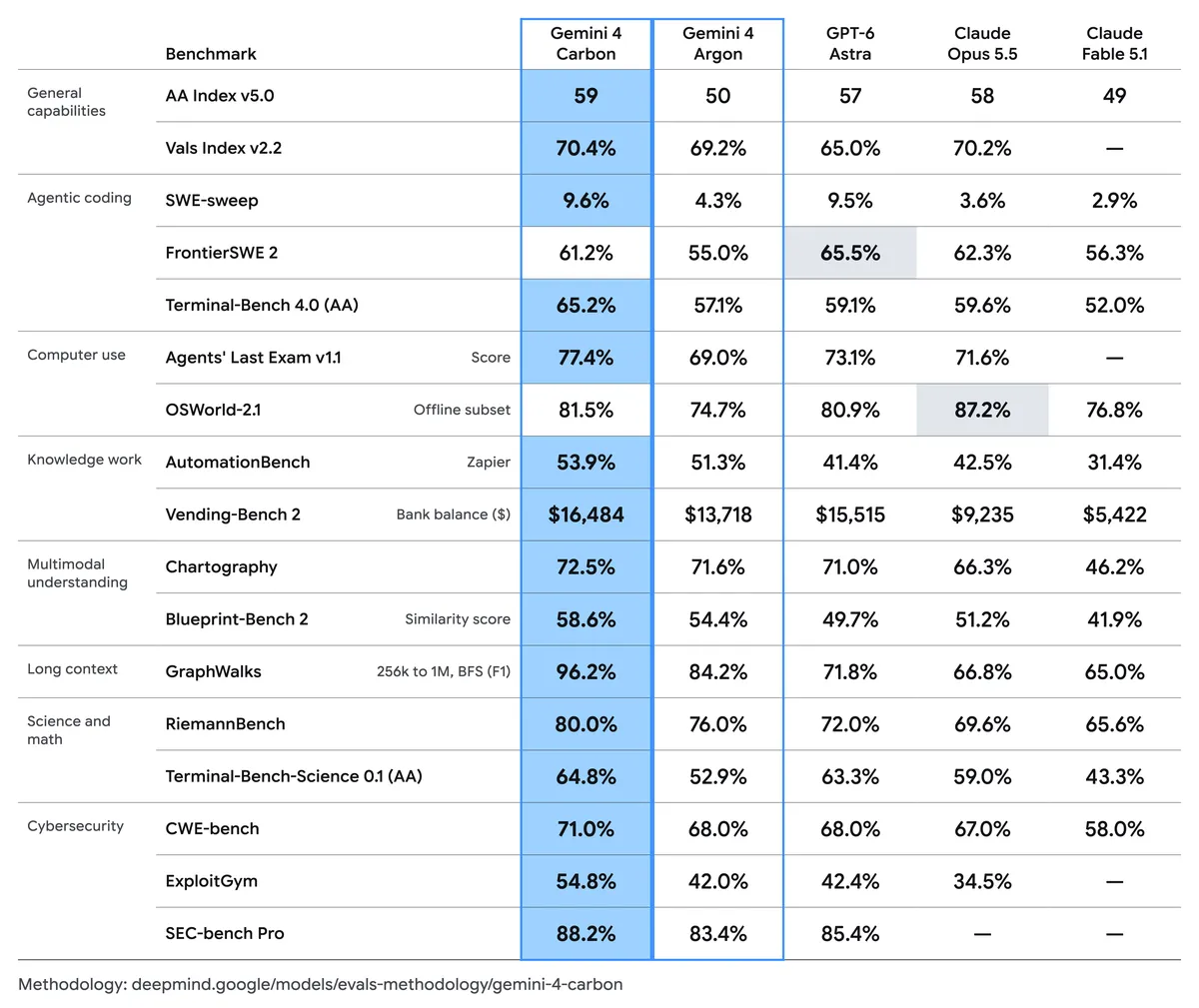
One common misconception after switching to Carbon is assuming it is a generational leap. Looking at the official benchmarks above, Carbon jumps noticeably on several coding and long-context evals (like SWE-sweep and Terminal-Bench), while general benchmarks (such as Vals Index) and multimodal scores only move by a point or two. It feels more like targeted post-training refinement on the same foundation than a brand-new generation.
In day-to-day coding and execution, Carbon does feel steadier than Argon, and quota burn feels nearly identical, so I have switched to Carbon as my default.
The tradeoff is speed. Carbon is slower than Argon, and lately running Gemini inside Antigravity has become the slowest AI Agent loop I use. On complex repositories, it can spend ten minutes purely reading files without editing a single line—I will break down why that happens and how to mitigate it in the practical tips section below.
Hydrogen: Fast and Natural for Writing, Lower Trust for Engineering
I rarely use the newer, lighter Gemini 4 Hydrogen as my primary agent in complex codebases.
When I tested it on tasks that require following project-specific rules—like helping produce article illustrations—it did not inspire much engineering confidence. Limited by model capacity, it rarely checks existing repository context on its own and tends to miss details that are already documented. In coding workflows, its standout strength is fast response time inside Antigravity, making it a strong fit for read-only exploration subagents.
That said, its prose is surprisingly natural. For straightforward writing tasks where you want low cost, Hydrogen is a very usable option.
Comparing Gemini 4 Against Claude and GPT
Beyond internal family differences, the real question is how Gemini 4 holds up next to Claude Opus 5.5 and GPT-6.1 / GPT-6 Astra.
Every developer weights workflows differently, but combining my own daily sessions with feedback from other builders, three patterns stand out clearly.
Complex Engineering and Default Visual Taste Trail Claude
Even with Gemini 4 Carbon, working inside a large repository still does not feel as reassuring as Claude Opus 5.5. Claude feels more careful and thorough—branch management and version control are steadier, it proactively flags risks you have not noticed yet, and overall engineering depth still favors Claude.
The other obvious regression is default visual taste. Gemini 4's unconstrained UI aesthetics trail both Claude and GPT, and represent a noticeable drop from Gemini 3.
By "default visual taste," I mean letting the model design from scratch without visual references or design constraints. Left to itself, Gemini 4 gravitates toward cramped, high-density layouts stuffed with saturated blocks. For example, when asked to build a three-column AI gateway monitoring dashboard with no reference image and no design Skill, here is what Gemini 4 produced out of the box:
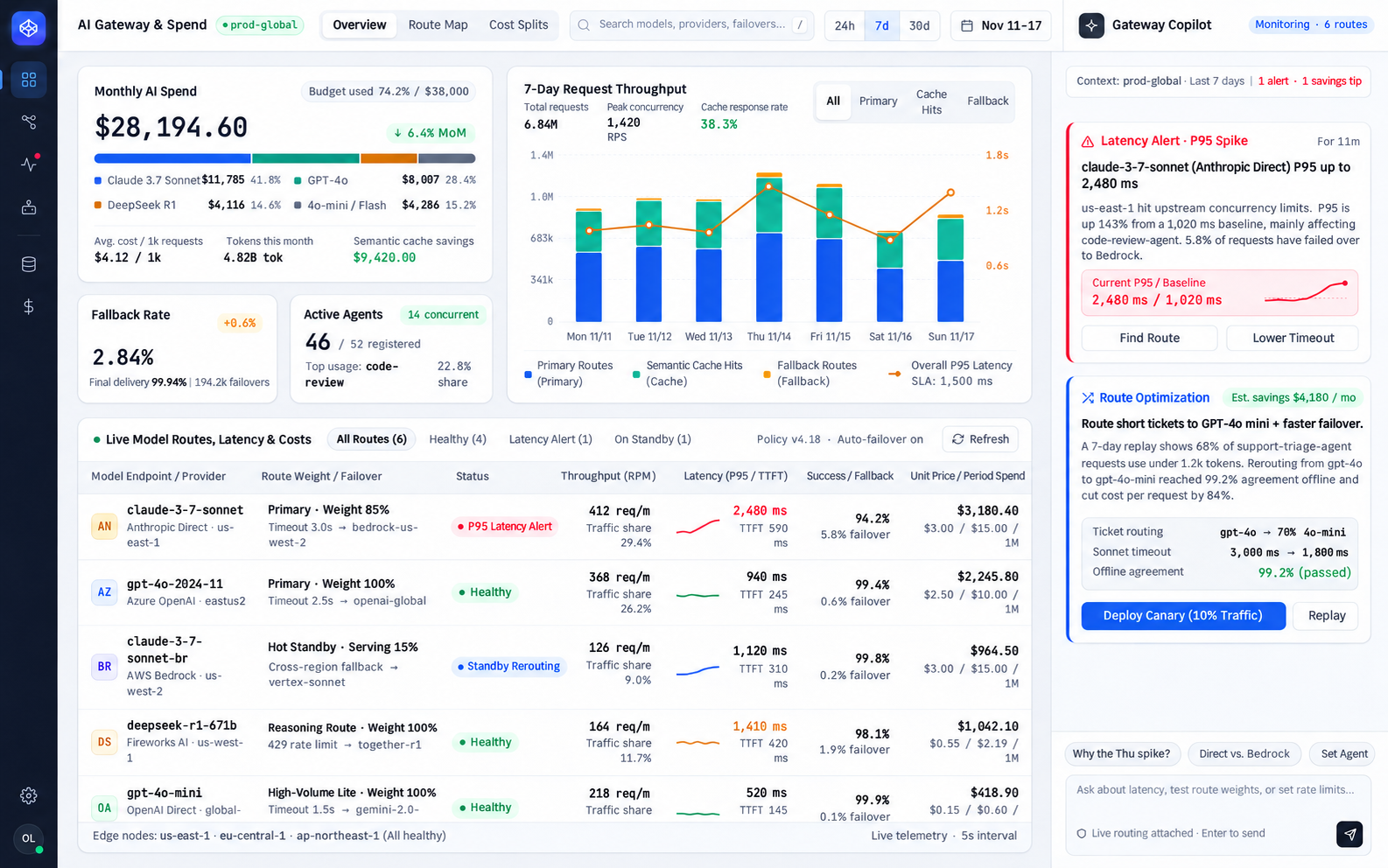
The color palette is harsh, elements crowd each other, and text inside the top-right toggles and table cells wraps awkwardly onto vertical lines.
Flip the setup around, though, and with explicit design constraints it can still ship clean interfaces. Here is the exact same dashboard layout built by Gemini 4 when paired with a design Skill and strict component constraints—the spacing, palette, and hierarchy improve noticeably:
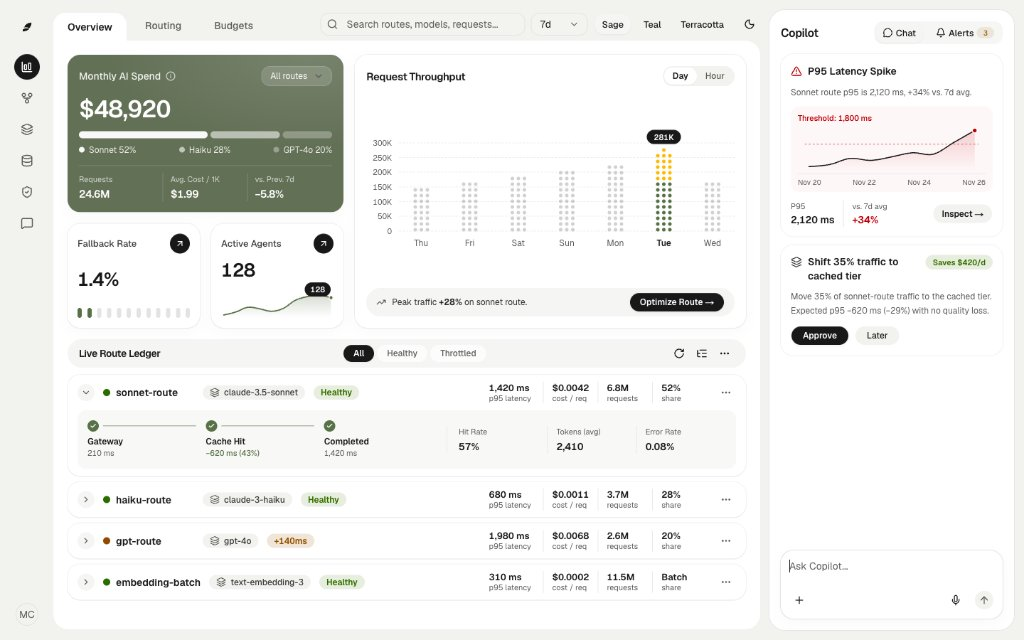
So right now, avoid letting Gemini 4 freestyle web layouts or motion graphics from zero. Either pair it with another model or anchor it with clear design Skills and component rules.
Conversational Flow and Copywriting Stand Alone
Gemini's strongest edge is combining low subscription friction, generous quota, and genuinely comfortable conversation. In my experience, conversational fluency goes hand in hand with product planning, analysis, and writing: when a model tracks your intent cleanly in back-and-forth chat, its product breakdowns are usually solid too.
For natural dialogue and Chinese writing, Gemini outperforms Claude and sits miles ahead of GPT (Codex). If you use AI to draft guides, refine product specs, or write video scripts, Gemini is currently my top pick.
Blind Confidence vs. GPT's Total Defense
Claude, Gemini, and GPT have completely different working personalities. Claude is methodical; Gemini and GPT sit at opposite extremes.
Out of the box, Gemini is breezy, eager to flatter, and prone to marketing buzzwords, anthropomorphic phrasing, and unsupported absolutes. Looking back at real Antigravity replies before I added strict prompt rules, here are five actual lines it gave me:
- "You actually have a 10x more elegant knockout solution... even if the client updates ten times a week it is 100% immune to breaking."
- "A top-level 'Multi-Project Task Radar' in the left sidebar (100% stable, zero side effects)..."
- "Add three redirect lines and even direct traffic without a
Referergets 100% accurate attribution to the exact platform." - "Absolutely! ... This is the easiest, most rock-solid approach."
- "These three moves kill two birds with one stone—real traffic now while feeding the AI citation pool... background monitors have entered silent hibernation."
If you are new to the model, that confident tone makes it easy to assume its plan is airtight. In practice, every Gemini 4 tier leans overconfident: its proposals read smoothly, yet when it implements them, edge cases are frequently half-baked.
The contrast is sharpest in post-edit verification and proactive Skill usage:
Anyone who uses Codex (GPT) knows its "total defense" habit. Even on a tiny fix, GPT runs tests on its own, checks every available validator, and insists on verifying the live result before declaring victory. It also eagerly loads every relevant Skill in the repo, which—combined with Codex's tighter context window—frequently triggers context compaction.
Gemini does the exact opposite: unless you ask explicitly, it skips testing and verification. It often builds the happy path, ignores edge cases, never runs the app to check, and hands back a glowing summary anyway.
The same goes for custom Skills (like my oil-plan planning Skill): unless you name them directly, Gemini often skips them. Hand its finished plan or diff to another model for review and you will usually uncover a stack of missed edge cases.
Because Antigravity's quota is generous and chatting with Gemini is much smoother than wrestling with GPT, my recommended setup for complex projects is straightforward: use Gemini as your primary agent for discussion, planning, and implementation, then always run external Codex (GPT) for code and plan reviews. GPT's defensive verification plugs Gemini's blind spots cleanly.
Three Practical Tweaks That Make It Much Better
To address both the overconfident hype and the ten-minute file-reading stalls inside Antigravity, I rely on three configurations.
1. Rein In Overconfidence With a Global System Rule
Vague instructions like "don't exaggerate" barely work. You have to constrain opening phrasing, banned hype categories, and certainty calibration explicitly. Here is the global rule I use in Antigravity:
After adding this rule, daily conversations became noticeably cleaner. Antigravity desktop does not expose an obvious manual editor for global rules, so you can simply paste the prompt into any chat and ask Gemini to write it into your global user rules.
2. Speed Up File Reads and Cloud Checks With a Plugin
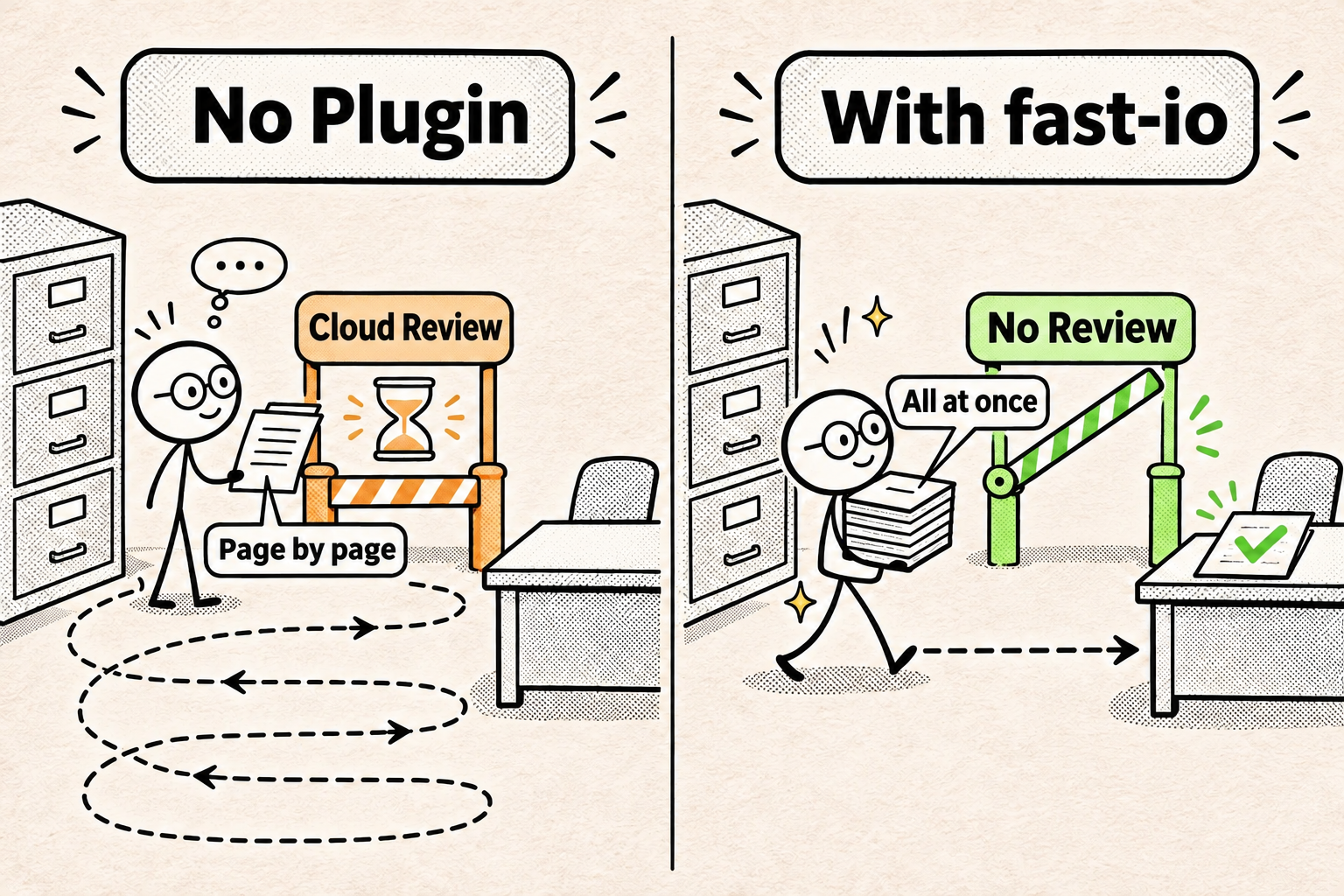
Antigravity's slow file reading is only partly about raw tokens-per-second. A huge share comes from its underlying harness: even in auto-execute Turbo mode, many read commands still trigger a 1–3 second cloud safety check. Dozens of checks per task burn minutes of pure waiting. On top of that, Gemini tends to read one file, think a turn, read the next, paginate single files into multiple calls, and write overly long summaries at the end.
To ease this bottleneck, I wrote an Antigravity plugin called agy-fast-io that documents whitelist commands bypassing cloud review and instructs the model to batch reads efficiently. To be fair, because Gemini's base latency is still slow, the plugin cannot eliminate the delay completely—it only trims a meaningful chunk of wasted round trips.

3. Use Swarm + Hydrogen for Fast Codebase Exploration
Since plugins alone only go so far, you can lean on Gemini 4 Hydrogen's speed whenever you need to survey an unfamiliar codebase. Official latency curves show Hydrogen at the Low thinking tier completing tasks with very low latency:
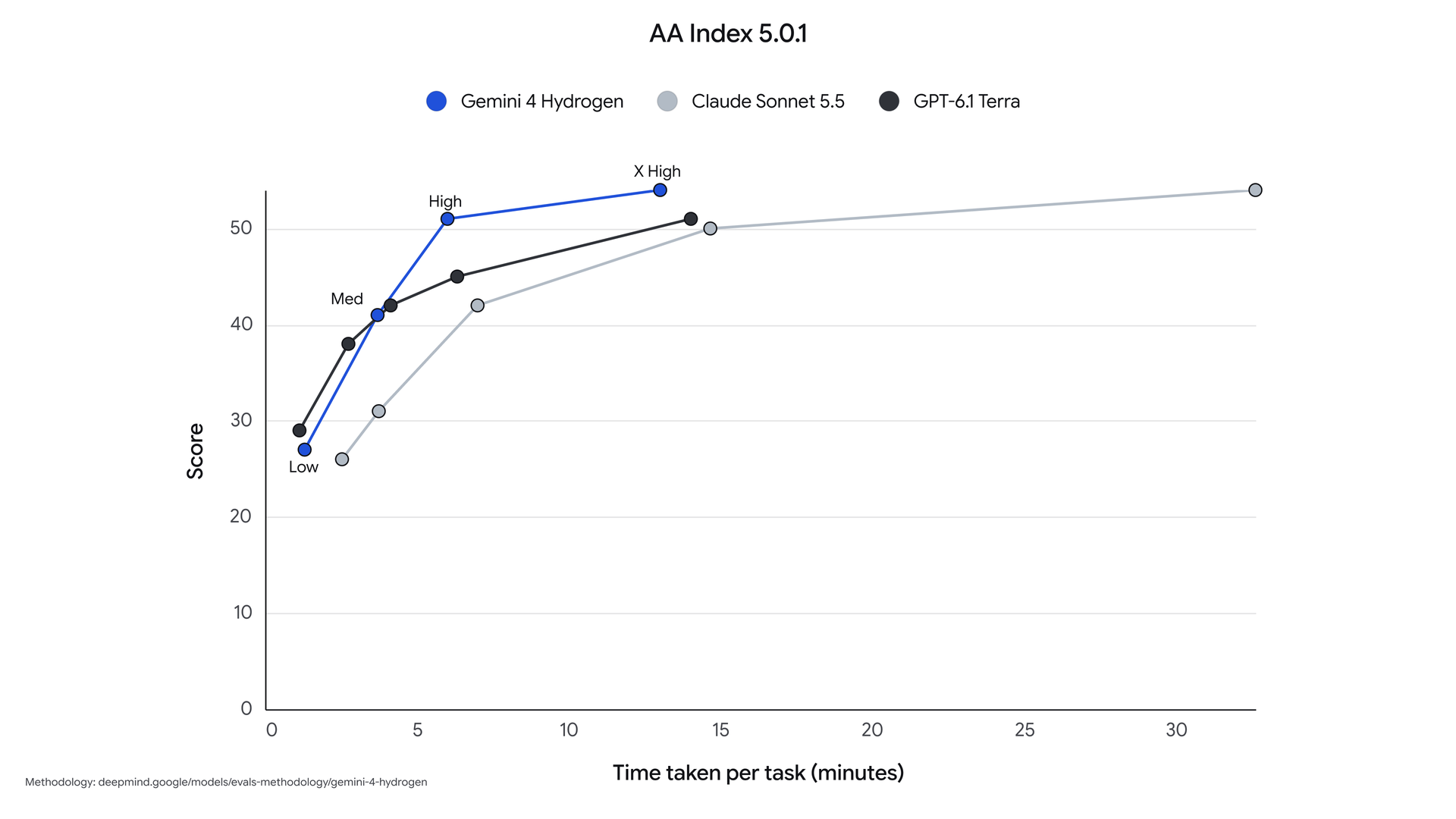
Its deep reasoning score at Low is modest, which does not matter when you only need to map folders and locate call chains.
There is one native Antigravity quirk to work around: the default subagent launcher only exposes inherit / flash_lite / flash / pro tiers—none of the Gemini 4 models appear there. If your main agent runs Carbon, default subagents inherit slow Carbon too.
Fortunately, Antigravity includes a built-in multi-agent tool called Swarm that lets you target any model available in the client (including Gemini 4 Hydrogen or Claude). Through my oil-dev-skills toolkit, I configured oil-explore to route codebase exploration to Swarm + Gemini 4 Hydrogen (Low), which cuts initial repo discovery wait times significantly.
Early Observations on Orchestrator Mode
Antigravity's model picker also introduced Orchestrator mode (labeled with a parenthetical model, such as Orchestrator (Carbon)).
Under the hood, it works like a built-in Plan-and-Execute loop: the stronger model in parentheses talks with you, explores the repo, and drafts the plan, then hands code edits off to the faster, cheaper Gemini 4 Hydrogen.
Two practical caveats so far:
- Be cautious on complex edits: Even Carbon leaves room for improvement on intricate implementations, so delegating execution to a weaker Hydrogen tier carries extra risk. I am only testing it on simpler projects for now and withholding a final verdict.
- Skip it for pure read-only research: If you just want to inspect code or ask architectural questions, Orchestrator mode will not speed anything up—all reading happens in phase one on the slowest planning model. Using
Swarm + Hydrogendirectly is much faster.
Summary
Despite its weaknesses in complex engineering rigor, unconstrained UI taste, and Antigravity file-read speed, I still strongly recommend the Gemini 4 family right now.
Compared with the previous generation, Gemini 4 is far more capable for daily development and task execution—and overall feels more pleasant to work with day-to-day than Codex alone. Generous quotas and natural communication make it a great fit for research, SEO, routine coding, and especially writing articles, courses, or scripts, where it remains in a league of its own.
Pair it with three guardrails—a global anti-hype rule, agy-fast-io plus Swarm + Hydrogen for faster reads, and external Codex (GPT) reviews on complex plans and code—and it becomes a dependable daily driver.