

Introduction
Hey everyone, I'm Oil. This guide walks through deploying your Vibe Coding project live onto the internet and connecting your own custom domain so anyone can open it with a link.
So far, we've run a personal site locally (http://localhost:3000) and backed up versions on GitHub. Now we'll unpack what deployment actually does under the hood, why modern hosting platforms beat renting a raw server for solo builders, how to connect Vercel to GitHub for automatic deploys, how to buy and bind a custom domain on Cloudflare, and how to handle production environment variables and build errors.
What Deployment Actually Does & Choosing a Platform
Beginners often ask: if localhost:3000 already works in my browser, why can't I just send that link to friends?
1. Why Localhost Links Don't Work for Anyone Else
Simply put, deploying means running your website code continuously on a cloud server.
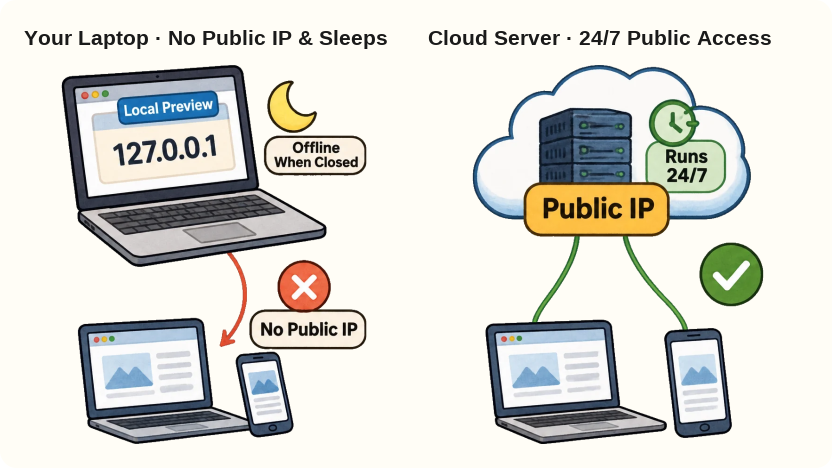
Every connected device has an IP address—its digital street address on the internet. localhost (127.0.0.1) is a special loopback address meaning "this exact computer right here." Send localhost:3000 to a friend and their phone looks inside their own phone, finding nothing.
Your personal laptop can't act as a public web server either: it isn't left awake 24/7, and standard residential broadband doesn't expose a static public IP for hosting.
A cloud server is simply a machine running 24/7 in a data center with a public IP address—so once your code runs there (and you bind a domain name), anyone in the world can visit it anytime.
2. Traditional VPS Servers vs. Modern Hosting Platforms
There are two very different paths to getting your code into the cloud:
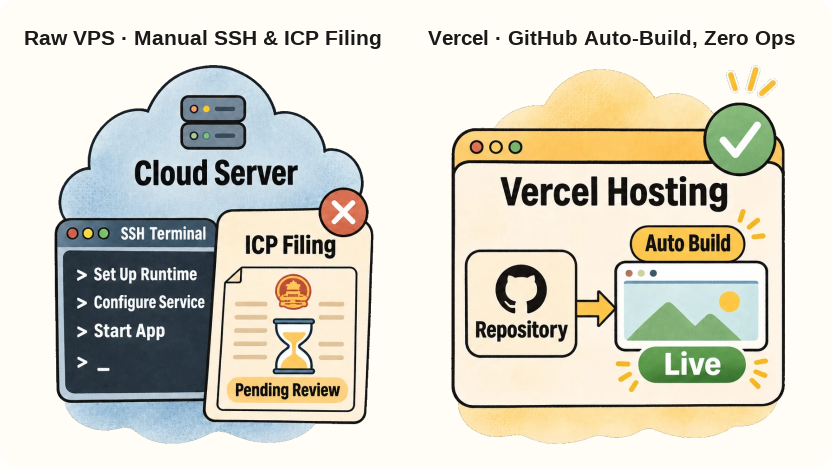
Path one is renting a traditional cloud VPS (from Alibaba Cloud, Tencent Cloud, Huawei Cloud, Volcengine, Qiniu, etc.). That hands you a blank remote computer—you have to SSH in, install runtimes, configure web servers, and manually run your code. Furthermore, any site served from servers inside mainland China legally requires ICP domain filing (typically taking 1–2 weeks before the domain can serve traffic).
Path two is using a modern application hosting platform like Vercel—my default choice for solo and full-stack projects.

Vercel already wires up building, hosting, environment variables, and status logs behind a clean dashboard. Connect your GitHub repo and your site goes live with zero server commands, no mainland ICP filing required (since servers run overseas), and a generous free tier for personal projects.
(Chinese cloud vendors now offer similar one-click hosting such as Tencent Cloud's EdgeOne Pages and Alibaba Cloud's ESA Pages. Keep in mind that ICP filing depends strictly on whether traffic uses mainland China edge nodes—not on how convenient the tool is. For zero filing hassle, native Next.js support, and official AI Agent integrations, Vercel is the cleanest pick.)
3. Sharing Single-File HTML vs. Full Websites
Match your sharing method to what you built:
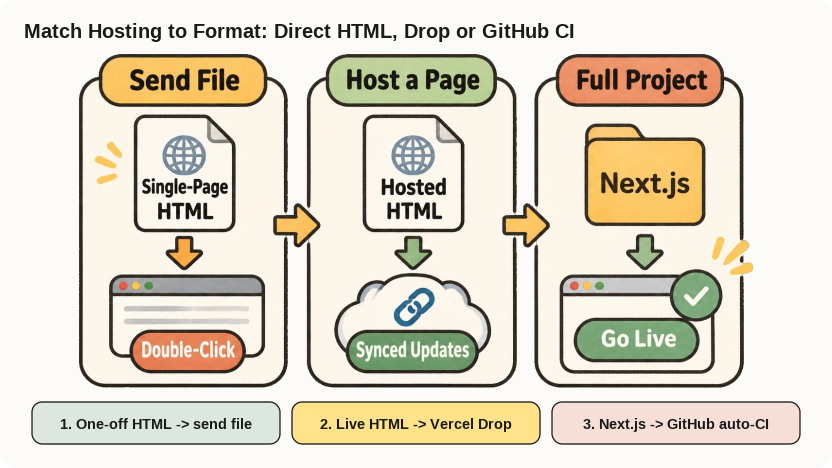
- One-off single-file
HTML: Just send the.htmlfile over chat—the recipient double-clicks it to view in any browser. - Single-file
HTMLyou plan to keep updating: Host it on Vercel (or drag it into Vercel Drop) so everyone sees the latest version at the same URL. - Full
Next.jssite: Connect your GitHub repo to Vercel—built by the creators ofNext.jsand the standard host for modern web apps.