
Introduction
Hey everyone, I'm Oil. Anyone entering Vibe Coding or AI Agents quickly runs into a wave of overlapping technical terms: Prompt, Context Engineering, MCP, CLI, Skill, and Harness. If MCP already connects external tools, why are builders switching to Skill + CLI?
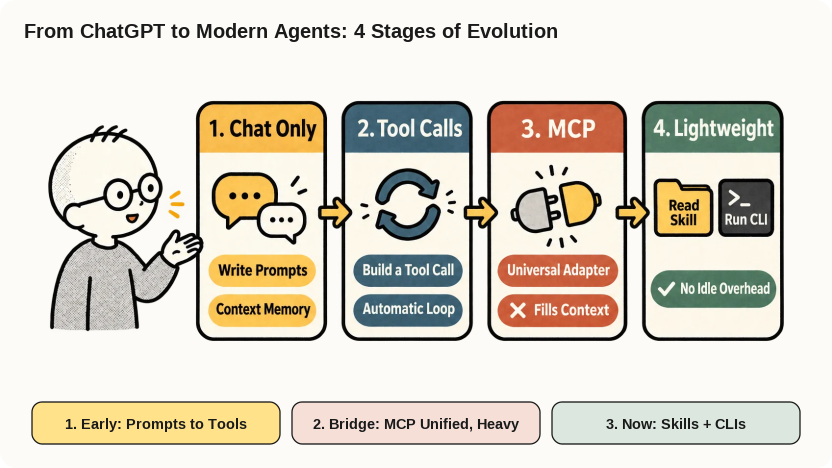
Walking chronologically from ChatGPT's launch through today's coding Agents makes everything click—once you see what exact bottleneck each generation solved, new buzzwords stop feeling intimidating.
1. Prompt & Context: From Crafting Prompts to Managing Memory
1. Three Classic Prompt Techniques—and Their Ceiling
When OpenAI launched ChatGPT on November 30, 2022, models could only reply with text. Editing your Prompt was your only lever, sparking Prompt Engineering around three core techniques:
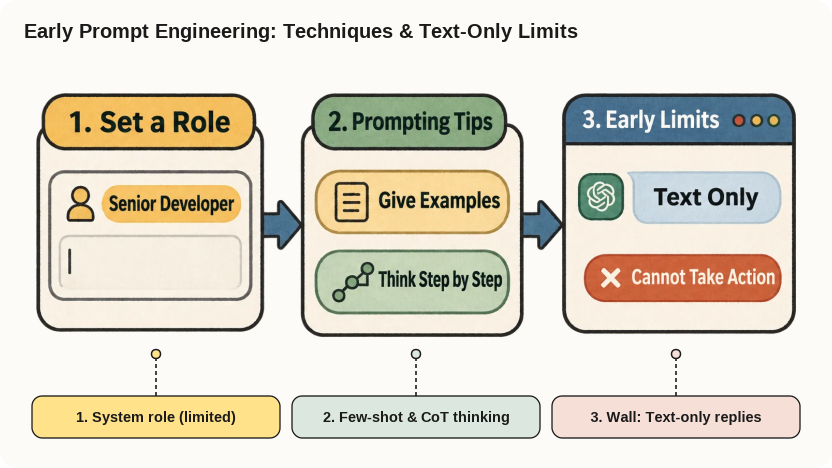
System Promptvs.User Prompt: Persona and persistent rules up top (formalized as separate API fields in March 2023), concrete question below.Few-shotexamples: Showing 2–3 input→output pairs so the model matches your exact pattern.- Chain of Thought (
CoT): Prompting "Let's think step by step"—in the May 2022 Tokyo/Google paper Large Language Models are Zero-Shot Reasoners, adding that single line jumped GPT-3 accuracy on MultiArith from17.7%to78.7%. Later, labs baked thinking directly into models.
Yet a clever prompt couldn't make a weak model code well—and multi-turn chats quickly grew from a single Prompt into a full Context.
2. What Is Context?
Prompt is just one part of Context. Because LLMs are stateless, they don't actually remember past turns on their own—every turn, your app bundles the entire prior conversation, any attached files or background docs, and your newest message together and resends it all.
Take a simple 3-turn exchange: you say "Hello", the model replies "I'm ChatGPT", and next you ask "I forgot your name." It can only answer "ChatGPT" because the app resent those earlier turns alongside your new question. Send "I forgot your name" on its own and the model has no idea. That full payload sent on every turn is Context.
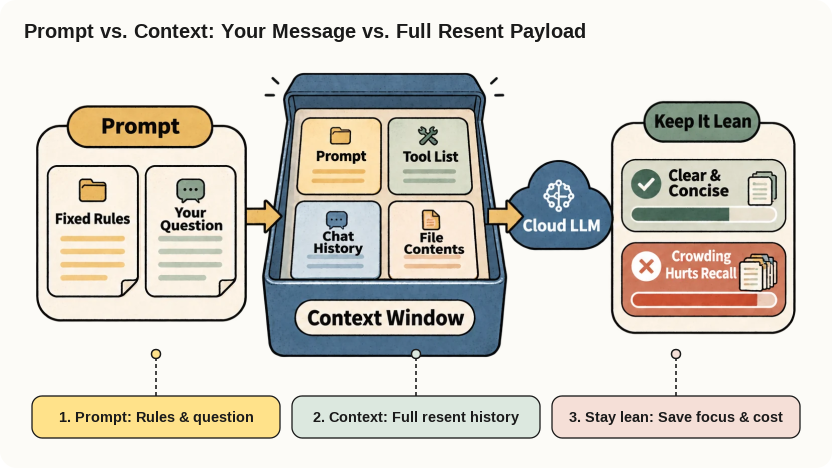
One timeless rule holds across every model: leaner, cleaner context always outperforms bloated context. There are two reasons:
- Finite
Tokenwindow: Capacity and billing are measured inTokens(roughly 1–2 tokens per English word or common Chinese character), and every model has a hard context limit. If you only want to ask "What's the weather today?" after pasting pages of coding history, that unrelated history helps nothing and fills up the window on every resend. - Scattered attention: Long, noisy histories make it harder for the model to recall what matters (see LLM Fundamentals: Attention & KV Cache)—Stanford's July 2023 Lost in the Middle study showed accuracy dropping 20%–30%+ when key instructions sat buried inside tens of thousands of irrelevant words.
Still, chat-only AI had one giant limitation: it could only output text—you still had to copy-paste code and run it yourself.
2. Learning to Act & Reason: Tools, ReAct Loops & Thinking Models
1. How Function Calling / Tool Actually Works
In June 2023, OpenAI introduced Function Calling (later unified as Tools). How can a cloud text model edit a file on your laptop?
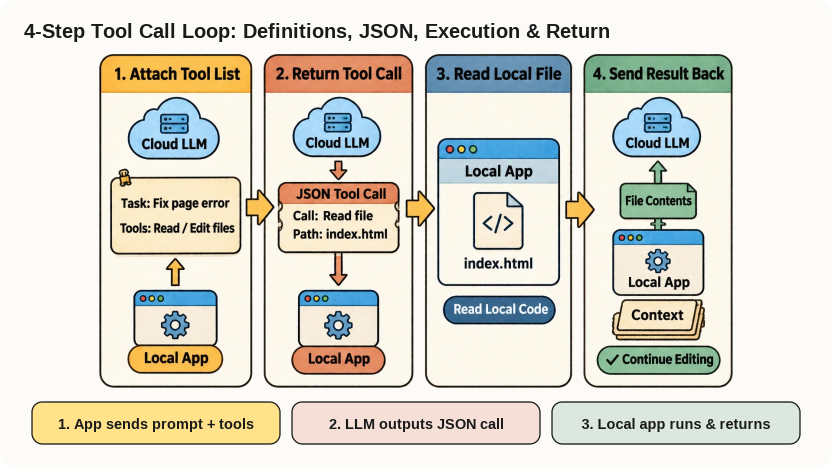
- Your local client sends available tool definitions (
Read,Edit, etc.) alongside your prompt. - The cloud LLM outputs a structured
JSONstring:{ "tool": "Read", "path": "index.html" }. - Your local client software runs the actual file read on disk and feeds the file contents back into
Context.
The cloud model never touches your computer directly—your local Agent software executes every action.
2. From One-Shot Tool Calls to the ReAct Loop
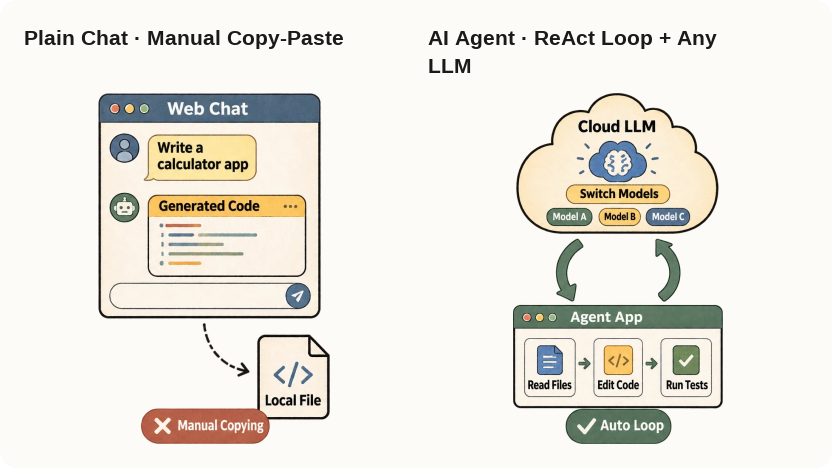
What if reading index.html fails? Pure Q&A stops dead. ReAct (not the frontend React framework—it stands for Reason + Act, pioneered by Shunyu Yao) closes the loop: Reason → Act (call tool) → Observation (read output or error) → Reason again until done. Using the same index.html example: if the read succeeds, the Agent moves on to editing the code; if it fails because of a mistyped path or tool name, the Agent inspects the error, adjusts its parameters, and retries. Crucially, this loop lives in your local Agent app—its cloud LLM "brain" (Claude, GPT, DeepSeek) is completely swappable.
3. From Fixed Workflows to Native Reasoning (Thinking) Models
Why did 2023–2024 tools like n8n, Coze, and Dify wire rigid drag-and-drop Workflow graphs?
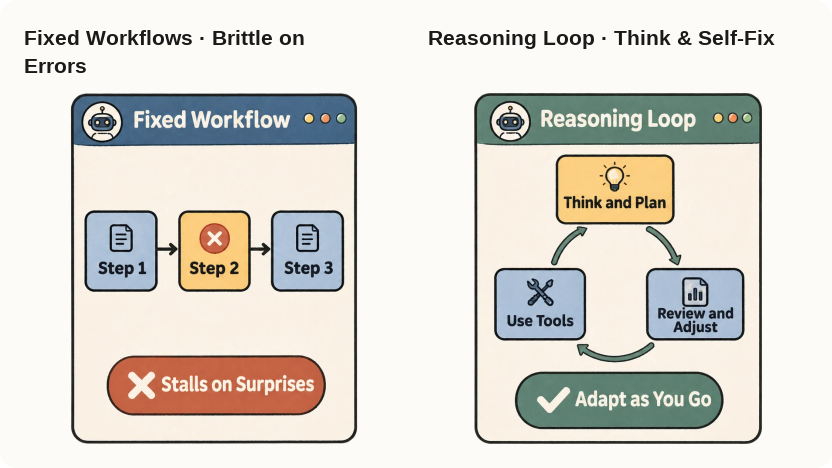
Because early models lacked deep self-correction: on Princeton's late-2023 SWE-bench benchmark, early GPT-4 Agents solved only 1.96% of real GitHub bugs—free-roaming loops got stuck repeating errors, so engineers hardcoded step-by-step pipelines. For example, turning a video into a Xiaohongshu cover meant locking in three fixed steps: (1) run a script to extract a clear frame showing the screen, (2) generate a matching title from the transcript, and (3) call an image tool to render the cover—chaining separate single-shot calls in a fixed pipeline (see Anthropic's Building Effective Agents for when fixed workflows still fit).

Everything flipped in late 2024 / early 2025 with native reasoning models like OpenAI o1 and DeepSeek-R1. Generating scratchpad Thinking tokens before acting let models catch mistakes before making tool calls—pushing SWE-bench Verified scores from 1.96% to 70%–80%+. Why does that extra thinking step help so much? Because unlike humans, an AI has to generate tokens in order to think—it cannot think silently. Writing out thinking tokens acts like scratch paper for a math problem, letting the model rule out dead ends before acting. That's also what Reasoning Effort (Low / Medium / High / Max) controls: how much thinking token budget the model spends before committing (in principle, higher effort produces more accurate answers—don't buy online claims that High beats Max).
3. From Function Calling to MCP: Solving Integration Fragmentation
In 2024, every AI client (Cursor, Windsurf, etc.) wanted to connect to GitHub, Notion, databases, and Figma—yet every client used custom tool formats: supporting 10 AI clients meant writing 10 separate adapters, and every new client forced every external app to integrate all over again. On November 25, 2024, Anthropic open-sourced MCP (Model Context Protocol) as a universal adapter: write one MCP Server, and any MCP client connects.
Under the hood, it works much like Function Calling: suppose you install a GitHub MCP with read-repo and write-repo tools. Your client sends both tool descriptions to the LLM; the model reads your request and returns a JSON call for the read tool; your local client calls GitHub's API through the MCP server and passes the code back into Context.
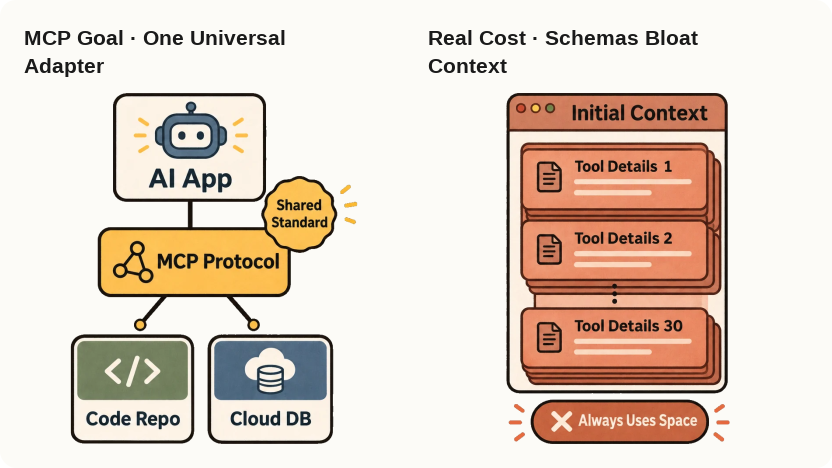
Yet in heavy daily use, MCP exposed two real drawbacks:
- Heavy upfront context tax: Every enabled MCP tool injects its name, description, and parameter
Schemabefore you even say hello—one typical MCP server consumes4,000–8,000 tokenspermanently on every new thread. - Service setup & cross-client friction: Early MCP servers often required running a local background process (though many now run as cloud-hosted connections), and early clients hit 30–40 tool caps or broke auth when switching between apps.
4. Once Shell & File Tools Became Standard: Skill + CLI & Agentic Search
By 2025, every serious coding Agent shipped built-in file read/write, file search, and terminal execution—triggering a lightweight shift both outward (connecting external apps) and inward (searching repos).
1. Outward: Why CLI Beats Heavy Local MCP
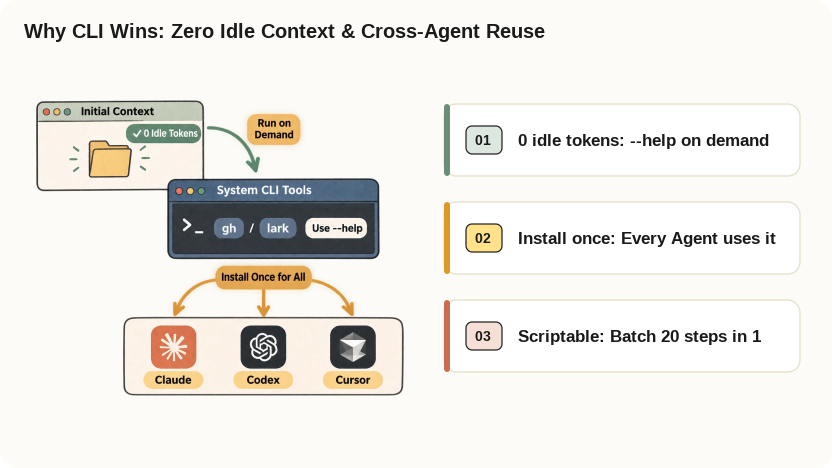
A desktop app you click through with a mouse (like the Lark desktop app) is a GUI (Graphical User Interface), whereas a CLI (Command Line Interface)—like gh for GitHub or Lark's CLI—runs inside the terminal via text commands. Driving a GUI forces an AI to inspect screenshots and click coordinates; a CLI takes pure text in and returns pure text out, which is what LLMs handle best:
- Zero idle context cost: Installed locally, adding zero tokens at startup; models already know common CLIs or inspect
--helpon demand. - Install once, works in every Agent: Mature auth, zero per-client reconfiguration.
- Scriptable batching: Combine dozens of steps into one script instead of looping through repeated tool calls one by one.
2. Why Pair CLI with Skill?
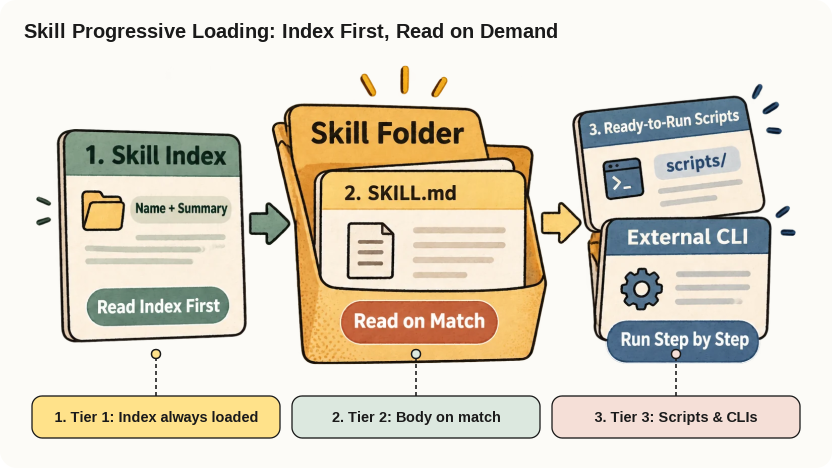
A CLI teaches syntax; a Skill (see What Are Skills? A Practical Guide) teaches your business workflow. Suppose you have Lark's CLI installed, but your account holds dozens of tables—telling the AI "log a new topic" leaves it guessing where to write. Putting the exact target table ID, required fields, and CLI steps into a Skill costs only one summary line at idle, and loads the full playbook the moment you ask to log a topic. Unlike rigid 2024 Workflows, a Skill still runs inside an autonomous reasoning ReAct loop.
3. Inward: From Vector RAG Indexes to On-Demand File Search
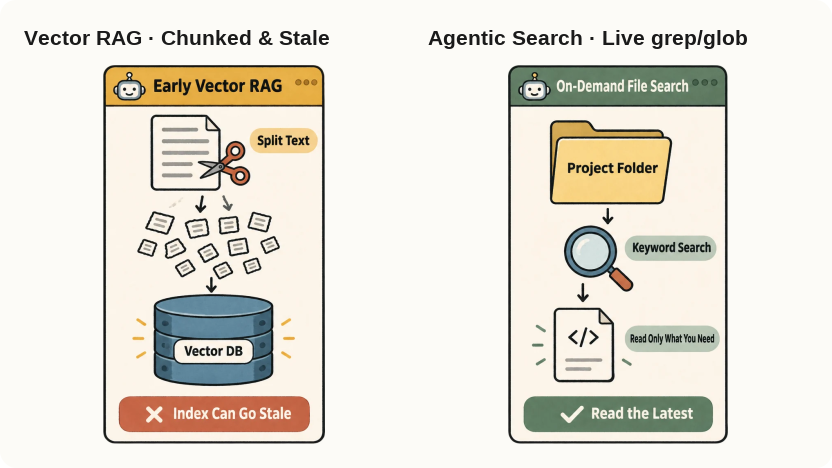
Traditional RAG chunked docs into vector embeddings—going stale the instant code changed and shattering cross-file call context. Modern Agents instead work like human engineers: grep for keywords, glob filenames, read exact source lines. As Vercel documented in We Removed 80% of Our Agent's Tools, stripping 17 custom retrieval tools down to plain file + shell tools made queries 3.5× faster, cut tokens 37%, and raised success from 80% to 100%.