 OpenAI 团队
一张真正好用的视觉素材,放在任何背景底色上都应该自然服帖。如果生成的图片自带原生透明背景(Alpha 通道),我们就可以把同一套视觉元素反复应用在活动落地页、品牌网站、演示文稿和商品目录里,既不会在深色底板上留下一块突兀的白框,也不需要每次换背景都重新手抠边缘。
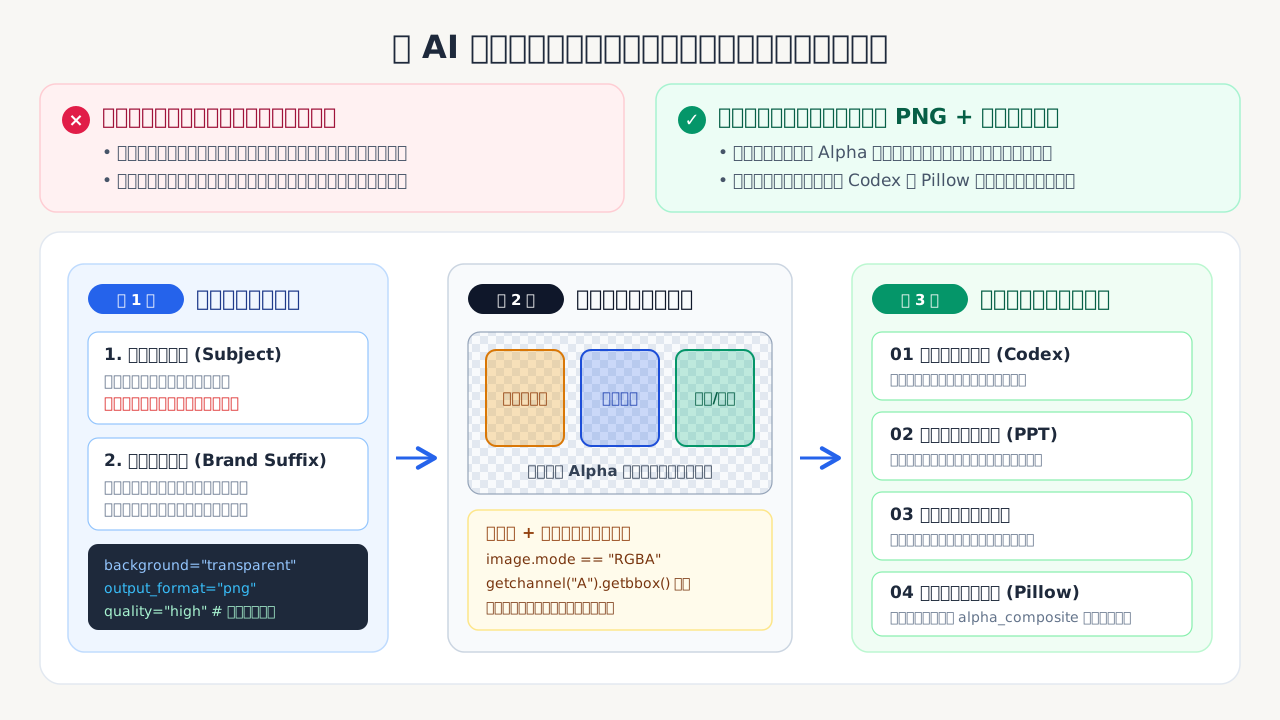
导读:把 AI 当成「透明组件工厂」,而不是「一次性海报生成器」 很多人用生图模型做设计时,习惯让 AI 一次性把「商品主体 + 背景氛围 + 排版文字」全画在同一张死图里。这样做虽然第一眼省事,但只要业务需要换个季节配色、放进公司的深色 PPT 母版,或者印在不同颜色的衣服上,整张图就无法复用;哪怕用传统抠图工具强行去背,遇到半透明玻璃折射、薄纱丝带或芦苇细丝也会留下难看的白边和残影。 这篇 OpenAI 官方实战指南提供了一套更可控的工程化思路:把「生成透明底独立组件」与「下游页面/幻灯片排版合成」彻底拆开。先用统一的「品牌风格后缀 + 孤立主体描述」配合
background="transparent"批量生产原生 RGBA 透明 PNG 资产,再用 Pillow 校验透明通道与裁切留白,最后交给 Codex 或代码合成到任意终端场景中。
本文将通过四个高频业务场景,完整演示这套可复用透明素材流水线:
- 跨季节电商活动页:一次生成透明底商品图,无需手动抠图,直接复用到春夏秋冬不同主题的店铺背景与活动横幅上。
- 企业品牌演示文稿:生成内部与外围全透明的数据图表,直接贴合公司强制要求的深色或渐变 PowerPoint 母版。
- 在线设计模板素材:生成圆角应用图标、刀模贴纸与植物装饰元素,让用户可以拖拽到任意模板或画布底色上。
- 按需印花周边商品(POD):生成一张透明底印花图案,批量合成到不同款式、不同颜色的空白服饰样机上。
环境准备与模型选择
开始之前,请先通过 pip install openai pillow 安装所需的 Python 依赖包,并在环境变量中配置好 OPENAI_API_KEY。你还需要一个支持原生透明背景的图像生成模型,以及用于自动构建网页与幻灯片的 Codex。
本教程默认使用 gpt-image-2.5-flare 模型,并通过设置 background="transparent" 请求输出带透明通道的 PNG 文件。如果你的场景对画面质感与细节要求极高,可以把代码中的 IMAGE_MODEL 切换为 "gpt-image-2.5-sunburst" 进行对比测试。这两款模型都支持原生透明背景。建议在初次对比时保持提示词、图片尺寸以及 quality="high" 参数完全一致,先重点检查透明通道纯净度、细微边缘和文字清晰度,确认达标后再根据业务需求权衡生成质量与响应速度。
需要注意:下文中展示的示例图片与页面截图保留自本指南最初的 GPT Image 2 版本,主要用于直观演示这套端到端工作流,而非 GPT Image 2.5 的实测跑分对比。由于重新运行生成代码会覆盖同名文件,如果你在本地运行 Notebook,建议先备份原始图片目录。
如果想进一步了解底层接口细节,可以参考 OpenAI 官方的图像提示词指南、模型列表页面以及图像生成指南。
import base64
import os
from pathlib import Path

from openai import OpenAI
from PIL import Image

if not os.getenv("OPENAI_API_KEY"):
    raise RuntimeError("Set OPENAI_API_KEY before running this notebook.")

IMAGE_MODEL = "gpt-image-2.5-flare"

client = OpenAI()
asset_dir = Path("images/transparent-image-assets")
asset_dir.mkdir(parents=True, exist_ok=True)
场景一:跨季节电商活动页
假设有一个虚构的植物家居香氛品牌 STILLROOM,希望把同一套核心产品系列复用到全年四个季节的活动主题页中。我们只需要生成一次透明底商品图,就能把同一批图片资产直接叠放在春、夏、秋、冬截然不同的页面背景上,省去逐张手工抠图的麻烦。
1.1 定义单品提示词与统一品牌后缀
这个活动网站包含该品牌的四款香氛单品。为了让四件单品放在一起时像同一场商业棚拍出来的成套作品,我们采用「单品独立描述 + 共享品牌与透明规范后缀(brand_prompt)」的拼接写法。
这里有一条非常关键的避坑原则:提示词里的文字指令优先级高于 API 参数 background="transparent"。如果你在提示词里顺手描写了背景幕布、桌面场景、环境底色或其他背景元素,模型就会优先照着你的文字把背景画出来,导致透明背景失效。因此,提示词必须严格聚焦在孤立的主体物件本身,并在文本中也明确要求输出透明背景。
# 共享品牌风格与真透明约束后缀:统一琥珀玻璃材质、拉丝黄铜配件、暖光棚拍质感,
# 并明确要求输出完整可见的孤立物体、保留自然折射与半透明层次,禁止任何背景、底座、投射阴影、文字与水印
brand_prompt = (
    "One object from STILLROOM, an understated luxury botanical home-fragrance "
    "atelier: artisanal warm amber and honey-tinted hand-blown glass, subtle "
    "brushed brass hardware, natural ivory cotton cord, quiet "
    "Japanese-Scandinavian restraint, warm side-lit editorial studio "
    "photography, photorealistic micro-detail, immaculate premium campaign "
    "quality. Full object completely visible and generously padded. Preserve "
    "every natural transparency, refraction, translucent layer and fine "
    "material edge. Output an isolated object on actual fully transparent "
    "alpha; no backdrop, no rectangle, no plinth, no cast shadow, no readable "
    "writing, no label text, no watermark."
)

# 四款香氛单品的独立外观描述:香水瓶(配薄纱丝带)、草本精华油(内含悬浮茴香枝)、藤条香薰(配纤细芦苇与羽毛状蒲苇)、磨砂玻璃蜡烛(配细棉绳与尤加利叶)
products = {
    "amber-parfum": (
        "A sculptural substantial clear honey-amber faceted glass "
        "eau-de-parfum bottle, slender rectangular body with softly rounded "
        "shoulders, heavy clear crystal cap, a small delicate sheer ivory "
        "organza ribbon loosely tied around the brushed brass neck with one "
        "translucent airy tail floating naturally; visible golden fragrance "
        "liquid and beautifully realistic glass refraction."
    ),
    "botanical-oil": (
        "A slim elegant cylindrical deep honey-amber transparent hand-blown "
        "glass botanical body-oil bottle, tall slender polished brushed-brass "
        "dropper cap with tiny ivory rubber bulb, translucent pale golden "
        "botanical oil inside and a tiny delicate preserved sprig of green "
        "wild fennel visible suspended within the liquid; subtle refraction, "
        "premium apothecary design."
    ),
    "reed-diffuser": (
        "A rounded low smoked-amber translucent glass home-fragrance diffuser "
        "vessel containing warm golden scented oil, topped by five naturally "
        "splayed very thin blonde rattan reeds and one extraordinarily "
        "delicate feathery dried pampas grass stem with fine hairlike wisps "
        "extending outward; realistic transparent glass and botanical fibers."
    ),
    "garden-candle": (
        "A quiet luxurious handmade botanical candle in a thick heavy "
        "translucent smoky-amber and milky frosted glass tumbler, creamy "
        "natural ivory wax, one small gently glowing clean candle flame, "
        "delicate transparent-edged frosted glass rim, a loose fine ivory "
        "cotton cord tied around the vessel with one tiny dried eucalyptus "
        "sprig, perfect warm reflections."
    ),
}
1.2 生成高质量透明底 PNG
在调用接口时,将单品描述与品牌后缀拼接在一起,同时显式传入 background="transparent"、size="1024x1536"(竖版构图适合修长的瓶身)、quality="high" 与 output_format="png":
generate_images = True

if generate_images:
    for filename, product_prompt in products.items():
        result = client.images.generate(
            model=IMAGE_MODEL,
            prompt=f"{product_prompt} {brand_prompt}",
            background="transparent",
            size="1024x1536",
            quality="high",
            output_format="png",
        )

        image_bytes = base64.b64decode(result.data[0].b64_json)
        (asset_dir / f"{filename}.png").write_bytes(image_bytes)
1.3 检验生成的四件商品资产与 Alpha 通道
生成的四张 PNG 原图无需做任何后期修图,即可直接用于活动网站。在正式投入下游排版之前,我们可以用一段简短的 Pillow 脚本做自动化质检:确认每个文件都包含真实的 RGBA 透明通道,并统计画面中完全透明像素(Alpha 值为 0)的占比,防止模型把灰白棋盘格直接画成实心像素。
for filename in products:
    with Image.open(asset_dir / f"{filename}.png") as image:
        if image.mode != "RGBA":
            raise ValueError(f"{filename}.png does not have an alpha channel.")

        transparent_pixels = image.getchannel("A").histogram()[0]
        total_pixels = image.width * image.height
        transparent_percentage = 100 * transparent_pixels / total_pixels

        print(
            f"{filename}.png: {image.width}x{image.height}, "
            f"{transparent_percentage:.2f}% fully transparent"
        )
实测输出的透明像素占比如下:
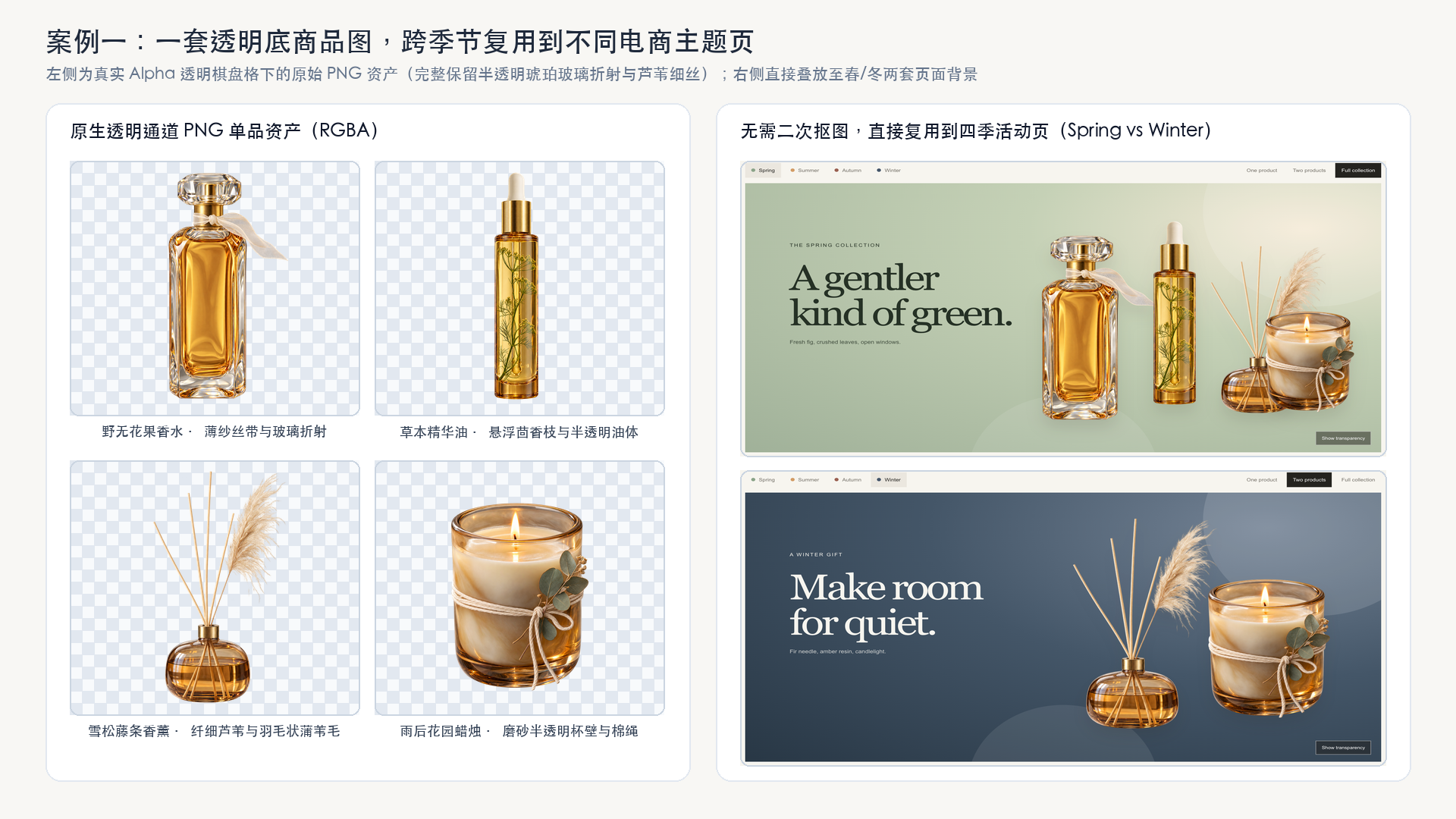
amber-parfum.png(野无花果香水):1024×1536,57.42%完全透明botanical-oil.png(草本身体精华油):1024×1536,77.47%完全透明reed-diffuser.png(雪松藤条香薰):1024×1536,69.75%完全透明garden-candle.png(雨后花园蜡烛):1024×1536,45.84%完全透明
1.4 用 Codex 构建四季切换活动落地页
拿到四张验证通过的透明 PNG 后,直接把它们连同下面这段提示词交给 Codex,让它为 STILLROOM 搭建一个响应式单页商店。页面支持在春、夏、秋、冬四套主题底色与文案之间一键切换,支持切换展示单件主推品、两件组合或四件全家福,并提供一个「显示透明棋盘格(Show transparency)」开关,方便直观检验透明通道效果。
codex_prompt = '''
Build a simple, responsive single-page campaign website for STILLROOM, a
premium botanical home-fragrance brand, using these existing transparent PNGs:

- images/transparent-image-assets/amber-parfum.png
- images/transparent-image-assets/botanical-oil.png
- images/transparent-image-assets/reed-diffuser.png
- images/transparent-image-assets/garden-candle.png

Show the heading "One collection, four seasons." Add Spring, Summer, Autumn,
and Winter controls that change the campaign background and seasonal copy.
Include controls for one product, two products, and the full collection.
Let visitors choose the featured product and rearrange the same transparent
PNGs over every background. Add a "Show transparency" checkerboard toggle.
Keep the page visually clean and centered on the products. Do not generate
replacement images or run a separate background-removal step.
'''.strip()

print(codex_prompt)
1.5 查看成品落地页与高难度边缘细节
下图展示了这四张原始透明 PNG 在真实 Alpha 棋盘格下的细节,以及直接复用到春季(鼠尾草绿背景,四件全系列展示)与冬季(深海蓝背景,双单品组合展示)两套活动主题页上的最终效果:
仔细观察最难处理的边缘与半透明材质
在春季浅绿底色与冬季深蓝底色之间切换时,可以重点观察以下几个细节:透明琥珀玻璃与磨砂玻璃杯壁的通透感、香水瓶瓶颈处那根轻薄透光的欧根纱丝带、香薰瓶上方纤细的藤条与毛茸茸的蒲苇细丝,以及蜡烛杯外缠绕的细棉绳。
如果先生成实心背景图再用传统抠图工具去背,这类极细纤维和半透明材质往往会被一刀切掉、留下一圈生硬的白边光晕(Halo),或者把原本通透的玻璃变成死气沉沉的不透明色块。而在生成阶段直接让模型输出原生 Alpha 通道,则能完整保留这些微妙的折射与发丝边缘,让同一件商品无论放在浅色还是深色背景上都浑然一体。
场景二:企业品牌演示文稿(PPT)
企业团队在制作汇报材料时,通常必须严格使用公司规定的 PowerPoint 母版主题(往往带有特定的深色底板或品牌渐变背景)。如果直接把一张带白色实心背景的 AI 生成图表贴上去,白框会显得非常扎眼;而使用透明底 PNG 图表,则能让幻灯片原有的渐变底色自然透出来。
2.1 定义演示场景与模拟业务数据
假设我们要为虚构的企业软件公司 Northstar Cloud 制作一页董事会汇报幻灯片,需要展示两组核心数据:四个季度的营收增长情况,以及合格销售商机(Pipeline)在各大区的占比分布。以下数据仅为演示虚构:
quarterly_revenue = {
    "Q1": 42,
    "Q2": 51,
    "Q3": 63,
    "Q4": 78,
}

regional_pipeline = {
    "North America": 46,
    "Europe": 29,
    "APAC": 25,
}

revenue_growth = (
    (quarterly_revenue["Q4"] - quarterly_revenue["Q1"])
    / quarterly_revenue["Q1"]
)

print(f"Quarterly revenue: {quarterly_revenue} USD millions")
print(f"Regional pipeline: {regional_pipeline} percent")
print(f"Q1-to-Q4 revenue growth: {revenue_growth:.0%}")
2.2 编写「内部全透明」的图表提示词
生成透明图表时有一个极易忽略的关键细节:不仅要让图表外轮廓四周透明,还必须在提示词里明确要求图表内部区域也保持透明。
针对深色企业母版,我们需要在提示词里同时交代三件事:
- 使用白色或浅色数据标签,搭配与深色底板对比鲜明的品牌色柱体/扇区;
- 明确要求绘图区(plot area)、网格线间隙、柱体之间的空隙、环形图中心孔洞以及图例周围区域全部保持透明;
- 严禁添加背景底板、实心面板、外框、标题栏或卡片底座。
关于数值精度的工程提醒:尽管我们在提示词里传入了精确的业务数值,但生图模型输出的依然是位图插画(Raster Artwork)。在将图表放入正式汇报前,务必核对图中的文字标签、数值与柱高/扇区比例是否与原始数据完全一致。对于数值精度要求极其严苛的生产级财务报表,建议用确定性代码(如 Matplotlib、ECharts 或原生 PPT 图表)渲染几何图形,仅将生图模型用于绘制配套的视觉插画与装饰组件。
revenue_values = ", ".join(
    f"{quarter} = ${amount}M"
    for quarter, amount in quarterly_revenue.items()
)

pipeline_values = ", ".join(
    f"{region} = {percentage}%"
    for region, percentage in regional_pipeline.items()
)

chart_prompts = {
    "quarterly-revenue-growth": (
        "Create one polished enterprise bar chart on a genuinely "
        "transparent background for a dark navy PowerPoint slide. "
        f"Use exactly four ascending bars with these values: {revenue_values}. "
        "Use cobalt blue, bright blue, electric azure, and turquoise bars. "
        "Add white quarter labels below each bar and white dollar-value "
        "labels above each bar. Add a subtle turquoise upward-trend arrow. "
        "Keep the plot area, grid, and space between bars transparent. "
        "Do not add a background, filled panel, frame, title, or card."
    ),
    "regional-pipeline-mix": (
        "Create one polished enterprise doughnut chart on a genuinely "
        "transparent background for a dark navy PowerPoint slide. "
        f"Use exactly these regional pipeline shares: {pipeline_values}. "
        "Use turquoise, cobalt blue, and coral segments, with a white "
        "100% label in the center. Place a white-text regional legend "
        "beside the chart. Keep the doughnut center, legend area, and "
        "all surrounding space transparent. Do not add a background, "
        "filled panel, frame, title, or card."
    ),
}
2.3 生成并检验透明 PNG 图表
同样请求 background="transparent" 与 output_format="png"。这里选用 1536x1024 横版构图,给图表旁边的图例和文字标签留出充足空间,并开启 quality="high" 以提升小字号标签的渲染清晰度:
generate_charts = True

if generate_charts:
    for filename, prompt in chart_prompts.items():
        result = client.images.generate(
            model=IMAGE_MODEL,
            prompt=prompt,
            background="transparent",
            size="1536x1024",
            quality="high",
            output_format="png",
        )

        image_bytes = base64.b64decode(result.data[0].b64_json)
        (asset_dir / f"{filename}.png").write_bytes(image_bytes)
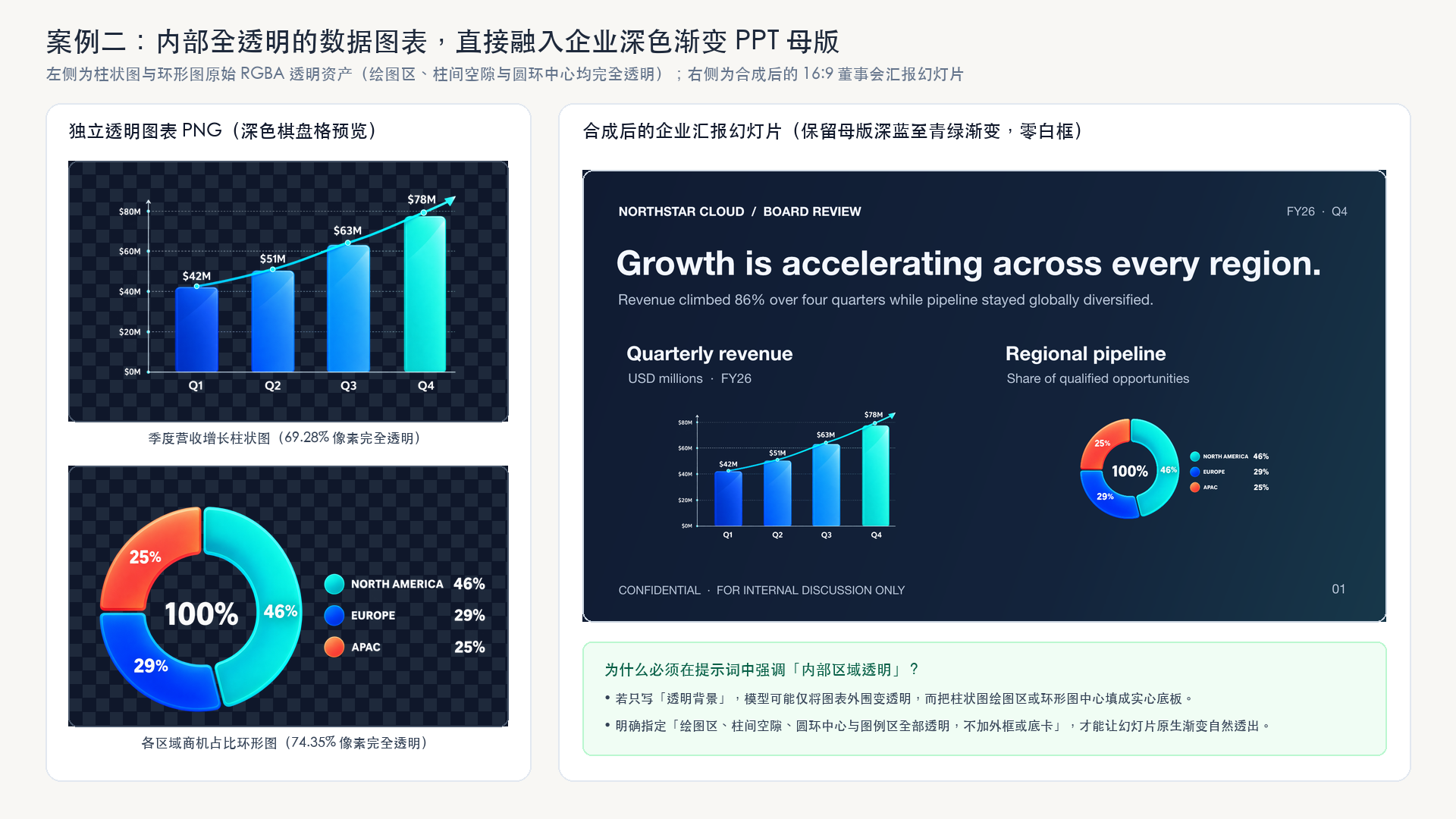
生成完成后,再次运行 Alpha 通道质检脚本,确保两张图表不仅带有 RGBA 通道,而且内部与周围确实包含高比例的完全透明像素(实测柱状图透明像素占比为 69.28%,环形图为 74.35%):
for filename in chart_prompts:
    with Image.open(asset_dir / f"{filename}.png") as image:
        if image.mode != "RGBA":
            raise ValueError(f"{filename}.png does not have an alpha channel.")

        transparent_pixels = image.getchannel("A").histogram()[0]
        total_pixels = image.width * image.height
        transparent_percentage = 100 * transparent_pixels / total_pixels

        if transparent_pixels == 0:
            raise ValueError(f"{filename}.png has no fully transparent pixels.")

        print(
            f"{filename}.png: {image.width}x{image.height}, "
            f"{transparent_percentage:.2f}% fully transparent"
        )
2.4 用 Codex 生成品牌化 PowerPoint 幻灯片
接下来,把两张透明图表 PNG、原始业务数据以及母版配色要求一并交给 Codex,让它生成一页可编辑的 16:9 PowerPoint 幻灯片。我们在提示词中特别强调:保留每张 PNG 的原生透明通道,直接透出幻灯片的深蓝至青绿渐变背景,不要给图片套白色边框或实心底板。
presentation_prompt = f"""
Create one editable 16:9 PowerPoint slide for a fictional NORTHSTAR CLOUD
FY26 Q4 board review using these existing transparent PNG charts:

- images/transparent-image-assets/quarterly-revenue-growth.png
- images/transparent-image-assets/regional-pipeline-mix.png

Mock quarterly revenue, in USD millions: {quarterly_revenue}
Mock regional pipeline mix, in percent: {regional_pipeline}
Q1-to-Q4 revenue growth: {revenue_growth:.0%}

Use a subtle dark navy-to-teal gradient as the slide's native background.
Add the headline "Growth is accelerating across every region."
Add the subheadline "Revenue climbed 86% over four quarters while pipeline
stayed globally diversified."

Place the quarterly revenue chart on the left and the regional pipeline chart
on the right. Add a heading and short data description above each chart.
Preserve each PNG's real alpha channel so the gradient remains visible behind
both charts. Do not add white image frames, background panels, decorative
shapes, or a separate background-removal step.

Keep the slide clear, polished, and consistent with an enterprise board-deck
template. Add the fictional company name, reporting period, confidentiality
notice, and page number as editable PowerPoint text.
""".strip()

print(presentation_prompt)
2.5 查看成品企业汇报幻灯片
在最终生成的 PowerPoint 文件中,两张图表依然是相互独立的透明 PNG 图层,而标题、副标题、页脚保密声明与页码则是原生可编辑的 PPT 文本框。可以看到,因为图表具备真正的内部透明通道,母版底部的深海蓝至青绿渐变能够自然地从柱状图背后、环形图中心孔洞以及每一个数据标签周围透出来,彻底告别了生硬的白框贴图感:
场景三:在线设计模板组件库
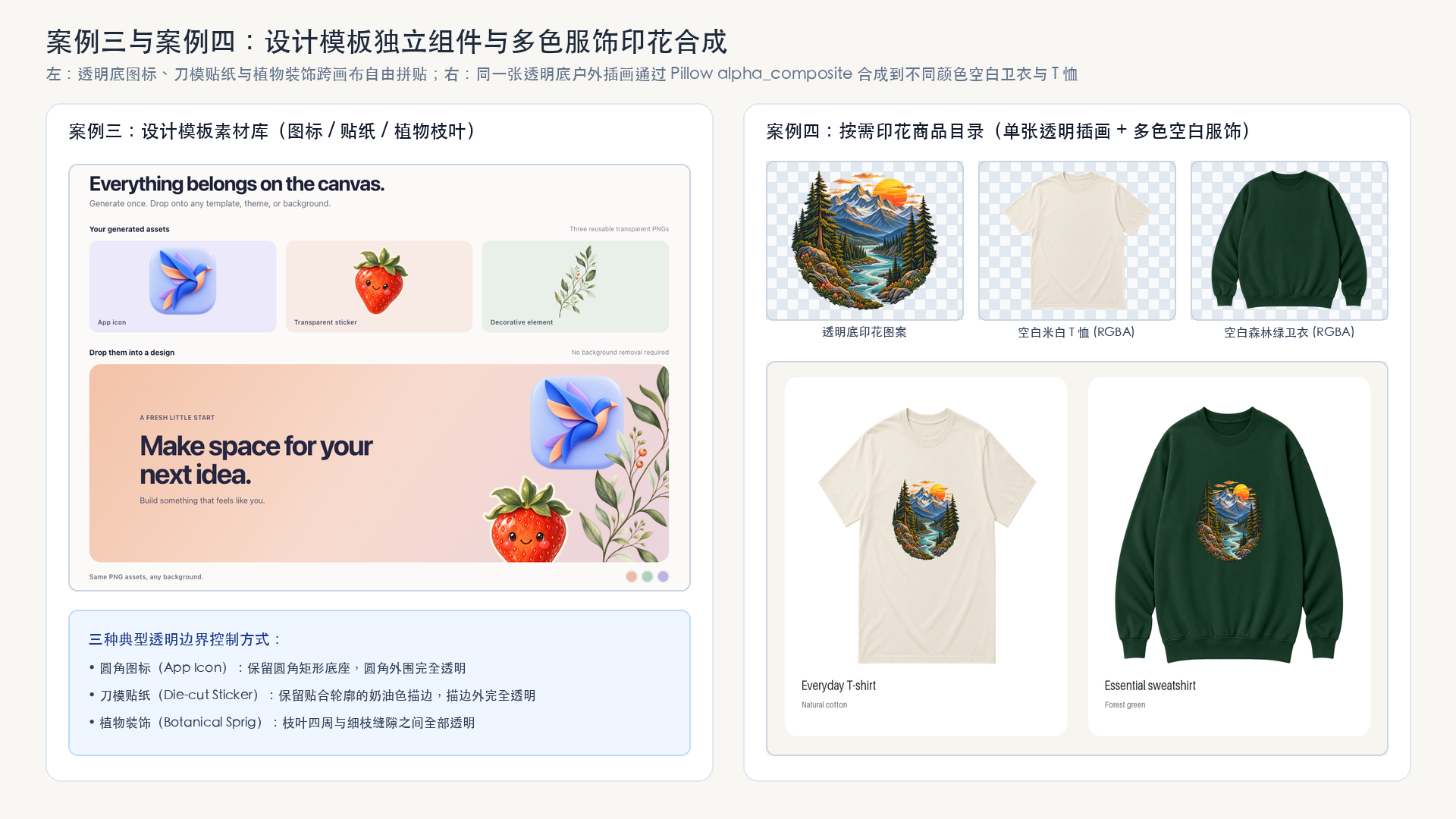
像 Canva 或 Figma 社区这类设计平台,需要大量可复用的应用图标、趣味贴纸和装饰性花草组件,供用户在不同版式中自由拼贴。直接生成带透明背景的独立设计元素,用户就能把它们随手拖进任何颜色的画布或海报模板里,无需自己建蒙版、抠白边或重涂底色。
3.1 按不同组件形态精确控制透明边界
不同类型的设计组件,对「哪里该保留实心、哪里该完全透明」有着截然不同的边界要求。我们在提示词里分别针对三种典型形态做了精确限定:
- 圆角应用图标(
design-app-icon):主体是一只钴蓝、薰衣草紫与蜜桃粉配色的折纸飞鸟,要求保留圆角矩形图标底座,仅将圆角方块外围的区域设为完全透明; - 刀模贴纸(
design-sticker):主体是一颗珊瑚红草莓卡通形象,要求保留紧贴轮廓的一圈奶油色刀模裁切白边(die-cut border),并将裁切边框以外的区域设为完全透明; - 植物装饰枝叶(
design-decoration):主体是一枝鼠尾草绿细枝与珊瑚色小浆果,要求不仅枝叶四周透明,连细枝与叶片交错的缝隙内部也必须全部透明。
design_prompts = {
    "design-app-icon": (
        "Create one premium rounded-square app icon with an abstract "
        "folded paper bird in cobalt blue, lavender, and peach. Keep "
        "everything outside the rounded icon tile transparent. No text, "
        "watermark, shadows, or background."
    ),
    "design-sticker": (
        "Create one illustrated strawberry character sticker with rich "
        "coral-red fruit, sage-green leaves, and a close-fitting cream "
        "die-cut border. Keep everything outside the sticker border "
        "transparent. No text, watermark, shadows, or background."
    ),
    "design-decoration": (
        "Create one delicate editorial botanical sprig with fine "
        "dark-sage branches, muted green leaves, and small coral berries. "
        "Keep all space around and between the thin branches and leaves "
        "transparent. No text, shadows, or background."
    ),
}

generate_design_assets = True

if generate_design_assets:
    for filename, prompt in design_prompts.items():
        result = client.images.generate(
            model=IMAGE_MODEL,
            prompt=prompt,
            background="transparent",
            size="1024x1024",
            quality="high",
            output_format="png",
        )

        image_bytes = base64.b64decode(result.data[0].b64_json)
        (asset_dir / f"{filename}.png").write_bytes(image_bytes)
3.2 在画布模板中自由拼贴与换底复用
生成的三个组件都是独立的透明 PNG 文件,可以任意移动、缩放或叠加到其他模板上。在示例网页中,我们将折纸飞鸟图标、草莓刀模贴纸与植物装饰枝叶组合在同一张彩色海报画布上,访客点击右下角的色卡即可随时切换画布底色,而三张透明 PNG 组件始终自然贴合在画布之上(见下一节汇总对比图左侧)。
场景四:按需印花周边商品(POD)
在按需印花(Print-on-Demand)电商平台中,卖家往往需要把同一个图案印在 T 恤、卫衣、帆布袋等不同款式、不同颜色的空白商品上。如果将「透明底印花图案」与「透明底空白服饰底板」分别生成为独立的透明资产,就能一套图案走天下,再也不需要针对每种衣服颜色反复去除图案四周的白框。
4.1 生成可复用印花图案与空白服饰底板
下面我们分别生成三张 1024x1024 的透明 PNG 资产:
- 户外主题丝网印刷风圆形插画(
merchandise-design):包含落日、板岩蓝山脉、常青松林、浅青绿河流与野花,要求图案外围与图形元素之间的镂空处全部保持透明,不带徽章外框或底色; - 空白米白色圆领 T 恤平铺图(
merchandise-blank-tshirt):正面居中平铺拍摄,胸前完全留白供后续叠印图案,衣服轮廓以外的区域全部透明,禁止出现模特、衣架或阴影; - 空白森林绿圆领卫衣平铺图(
merchandise-blank-sweatshirt):同样正面居中平铺、胸前留白、轮廓外完全透明。
merchandise_prompts = {
    "merchandise-design": (
        "Create one premium outdoors-inspired apparel illustration with "
        "an amber setting sun, slate-blue mountains, evergreen pine trees, "
        "a pale turquoise river, and small coral wildflowers. Arrange the "
        "elements into an organic compact circular composition with subtle "
        "screen-print texture. Keep the surrounding area and open spaces "
        "between the graphic elements transparent. No text, bounding "
        "badge, white rectangle, garment, or background."
    ),
    "merchandise-blank-tshirt": (
        "Create one photorealistic premium unisex ivory crew-neck T-shirt "
        "shown completely flat, front-facing, and centered. Leave the "
        "chest completely blank for a print design and keep everything "
        "outside the garment silhouette transparent. No person, hanger, "
        "mannequin, logos, graphics, shadows, or background."
    ),
    "merchandise-blank-sweatshirt": (
        "Create one photorealistic premium forest-green crew-neck "
        "sweatshirt shown completely flat, front-facing, and centered. "
        "Leave the chest completely blank for a print design and keep "
        "everything outside the garment silhouette transparent. No "
        "person, hanger, mannequin, logos, graphics, shadows, or background."
    ),
}

generate_merchandise_assets = True

if generate_merchandise_assets:
    for filename, prompt in merchandise_prompts.items():
        result = client.images.generate(
            model=IMAGE_MODEL,
            prompt=prompt,
            background="transparent",
            size="1024x1024",
            quality="high",
            output_format="png",
        )

        image_bytes = base64.b64decode(result.data[0].b64_json)
        (asset_dir / f"{filename}.png").write_bytes(image_bytes)
4.2 用 Pillow 自动裁边并将同一图案合成到多款服饰
因为印花图案与两件空白服饰都是彼此独立的透明 PNG,我们可以用一段简单的 Pillow 脚本完成自动化样机合成:
- 先定义
visible_region(image)辅助函数:通过image.getchannel("A").getbbox()找到所有非透明像素的最小外接矩形并自动裁掉四周多余的透明留白,这样在计算居中与缩放比例时就能完全按真实可见图形对齐,不会受生图时四周留白不均的影响; - 将空白服饰缩放到卡片合适尺寸,再将印花图案按衣服宽高的
32%等比缩放; - 调用
garment.alpha_composite(artwork, dest=(chest_x, chest_y))将透明图案精准叠印到胸口位置,最后输出双商品目录预览图。
from PIL import ImageDraw, ImageFont


def visible_region(image):
    # 自动裁除四周完全透明的留白边距,不改变任何可见像素
    bounds = image.getchannel("A").getbbox()
    if bounds is None:
        raise ValueError("Expected a transparent PNG with visible artwork.")
    return image.crop(bounds)


canvas = Image.new("RGBA", (1600, 1020), "#f7f5f0")
draw = ImageDraw.Draw(canvas)

heading_font = ImageFont.load_default(size=57)
body_font = ImageFont.load_default(size=21)
label_font = ImageFont.load_default(size=25)
small_font = ImageFont.load_default(size=17)

draw.text((86, 70), "One design, ready to wear.", font=heading_font, fill="#202a27")
draw.text(
    (89, 151),
    "One transparent artwork. Two products. No background removal.",
    font=body_font,
    fill="#68726d",
)

with Image.open(asset_dir / "merchandise-design.png") as image:
    print_design = visible_region(image.convert("RGBA"))

garments = [
    ("merchandise-blank-tshirt", "Everyday T-shirt", "Natural cotton"),
    ("merchandise-blank-sweatshirt", "Essential sweatshirt", "Forest green"),
]

for index, (filename, title, color) in enumerate(garments):
    card_x = 86 + index * 741
    card_y = 221
    card_width = 690
    card_height = 691

    draw.rounded_rectangle(
        (card_x, card_y, card_x + card_width, card_y + card_height),
        radius=28,
        fill="#ffffff",
    )

    with Image.open(asset_dir / f"{filename}.png") as image:
        garment = visible_region(image.convert("RGBA"))

    garment.thumbnail((610, 505), Image.Resampling.LANCZOS)
    garment_x = card_x + (card_width - garment.width) // 2
    garment_y = card_y + 55 + (505 - garment.height) // 2

    artwork = print_design.copy()
    artwork.thumbnail(
        (round(garment.width * 0.32), round(garment.height * 0.32)),
        Image.Resampling.LANCZOS,
    )

    chest_x = (garment.width - artwork.width) // 2
    chest_y = round(garment.height * 0.28)
    garment.alpha_composite(artwork, dest=(chest_x, chest_y))
    canvas.alpha_composite(garment, dest=(garment_x, garment_y))

    draw.text((card_x + 41, card_y + 578), title, font=label_font, fill="#202a27")
    draw.text((card_x + 41, card_y + 620), color, font=small_font, fill="#68726d")

output_path = asset_dir / "merchandise-print-mockups.png"
canvas.convert("RGB").save(output_path, optimize=True)
print(f"Saved merchandise preview to {output_path}")
可以看到,因为图案内部的镂空区域也是真透明通道,米白色棉布与森林绿卫衣的面料底色能够自然地从山脉、松树与太阳的缝隙间透出来;与此同时,这两件空白服饰底板也可以继续保存下来,随时与店里的其他印花图案组合出新的商品图:
评估与质检生成的透明资产
当团队开始批量生产这类透明视觉资产时,建议建立一套「人工抽检 + 视觉大模型自动巡检」相结合的质量评估机制:
- 人工体验反馈:在真实的落地页、高管幻灯片、设计模板和商品样机中收集团队对透明通道纯净度、细微边缘过渡、品牌调性契合度以及实际复用便利性的反馈;
- 多模态视觉模型(VLM)自动质检:制定明确的评分检查表(Rubric),让支持视觉理解的语言模型自动审阅生成结果与合成页面,重点拦截四类常见缺陷:
- 假透明或残留实心底板(如把灰白棋盘格画进像素、或者图表内部绘图区未透明);
- 主体边缘被生硬裁切(如瓶盖贴边被切、植物细枝断裂);
- 服饰印花位置或比例失调(如胸口图案偏高、偏小或超出衣身边界);
- 图表文字标签与源数据不符(如数字拼写错误、柱体高低顺序与金额倒挂)。
总结
借助原生透明 PNG 资产,团队只需生成一次视觉组件,就能跨越四季电商活动、企业品牌演示文稿、在线设计模板与周边商品目录反复复用,彻底省去繁琐的手工抠图环节。将这套「统一品牌提示词 + 原生透明通道生成 + 代码/Agent 下游合成」的工作流,与程序化 Alpha 校验及视觉模型评估结合起来,就能在规模化生产中稳稳守住视觉产出的品质与一致性。