
Introduction
Hey everyone, I'm Oil. This is Lesson 2 of Vibe Coding from Scratch: the core software engineering and AI concepts you need for Vibe Coding.
Many newcomers to AI coding ask a fair question: if AI writes code so well that we just describe requirements in plain language without typing a single line ourselves, why spend time learning engineering and AI fundamentals?
Let's start with why knowing these fundamentals saves you countless detours, and then map out the three groups of concepts every solo AI builder needs: frontend architecture, frontend/backend & cloud storage, and LLM API integration.
1. Keeping Control Over Your Product
In real projects, model capability varies a lot. With a frontier model, you can build a simple showcase page without knowing much under the hood. But the moment you want to save money—or don't have constant access to the strongest model—things change fast.
When a task gets more complex and the AI misses the mark, understanding basic engineering and AI concepts lets you step in and steer directly (for example: "extract this into a reusable component" or "return JSON from this endpoint"). Just as important, you gain real ownership over what you built. If you have zero idea how your product works underneath, you won't feel confident putting it in front of real users.
2. Long-Lived Products Need Someone Who Understands the Architecture
In my view, any live product meant to run reliably long-term still needs at least one person watching over it who understands engineering concepts—even with today's coding models.
If someone claims to have zero coding background and no grasp of engineering fundamentals yet maintains several production products, those projects are almost certainly fragile. Without architectural awareness or serious code review, letting AI pile on code feels fast for the first feature or two—then every new feature becomes painful. Legacy code and context tangle up, the AI gets confused reading its own repo, and you can't spot the structural problem or give actionable direction.
Core Frontend & Project Structure Concepts
With the "why" clear, let's start with the frontend structure you encounter on every web product.
1. From Single-File HTML to Next.js
In Everyday AI Agent Workflows, we saw how a single .html file lets you preview a layout quickly. In real products, though, one HTML file is rarely enough—a real product needs rich interaction, multiple pages, or saved data. A lone static HTML file barely counts as a full product.
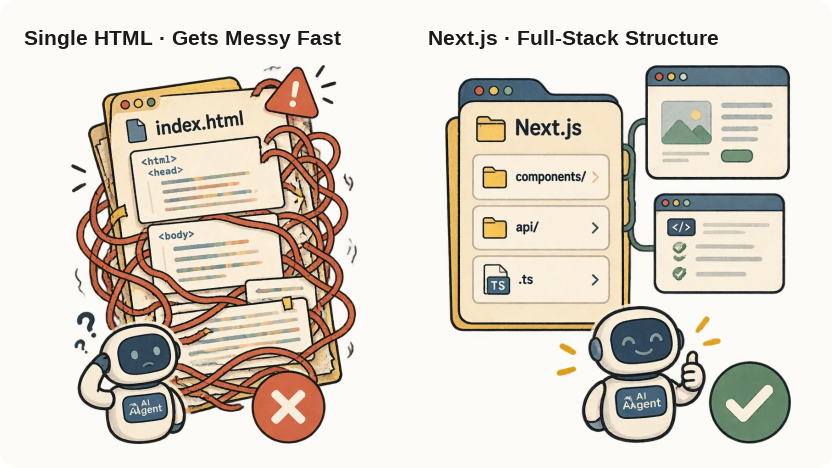
For most real projects, we use a modern frontend framework like Next.js (a framework is a pre-built project skeleton with standard folders and core plumbing already wired up; well-known products like Notion, Stripe, and OpenAI build extensively on the React / Next.js stack). Three reasons make Next.js my top recommendation for Vibe Coding:


- It is the framework AI knows best: Because huge numbers of open-source repos use
Next.js, models have seen enormous amounts of it in training—making them fluent and far less error-prone when building with it. - Built-in SEO friendliness: Pages are much easier for Google and Bing to index, bringing free organic search traffic (we explain how in the
SSRsection below). - Frontend UI and backend logic in one project: Inside a single
Next.jsfolder, you can write both the browser interface and the server code that stores data or calls LLMs. Having everything in one repo makes coordinating edits far easier for an AI Agent.
Once AI scaffolds a Next.js project for you, four core engineering concepts show up constantly in conversation and code edits:
2. Components and Functions
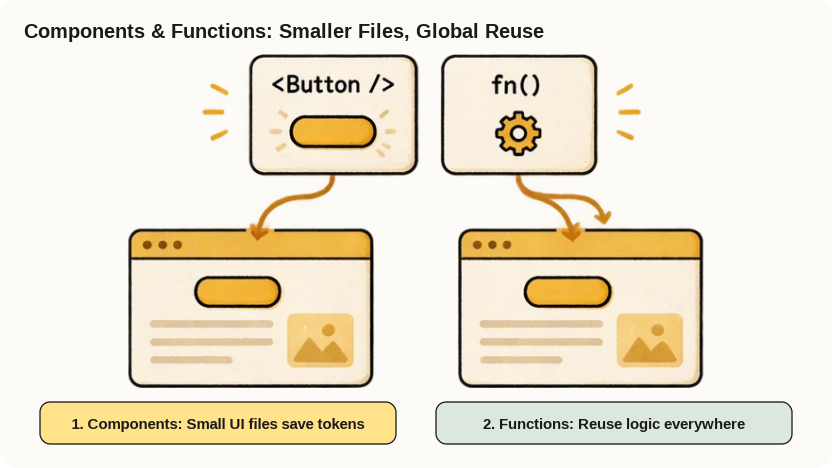
If you let AI keep appending code to one file unchecked, it quickly balloons to thousands of lines. Every edit then forces the AI to re-read the entire file, wasting tokens (the text chunks models bill and process) and risking accidental breakage elsewhere. The cure is components and functions:
- Components: Breaking UI pieces—navigation bars, buttons, pricing cards, dialogs—into separate reusable files. This delivers two immediate wins: huge token savings (editing the navbar only requires reading a short file) and consistent design (updating the shared button component updates every button across the site).
- Functions: Wrapping repeated logic into a named block. For instance, if multiple pages need to format raw timestamps into readable dates or compute a discounted price by user tier, have the AI extract that logic into one function and call it everywhere instead of copy-pasting the math.
3. JavaScript (JS) vs. TypeScript (TS)
First, separate the classic web trio in one sentence each:
HTML: Structure and text content (headings, inputs, buttons).CSS: Visual appearance (font sizes, colors, spacing).JavaScript(JS): The programming language that powers interactivity—opening modals, toggling dark mode, or sending user input to a server.
So what is TypeScript (TS)?
Simply put, TS is JS with an added layer of strict type checking. Suppose your code computes an order total and expects the unit price to be a number. In plain JS, if the AI accidentally passes text like "free" from another file, nothing warns you until a real user clicks checkout and crashes the page. In TS, because the type strictly requires a number, the type checker flags the mistake the instant the AI finishes writing the code.
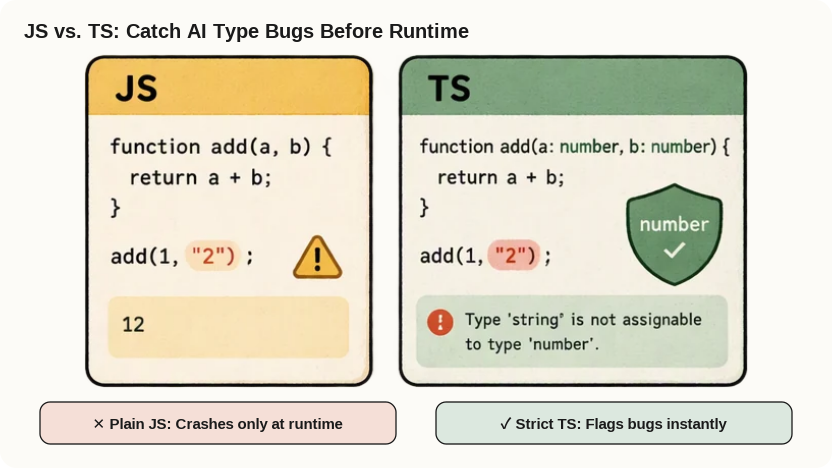
This matters even more now: when humans wrote every line by hand, TS felt like extra typing overhead; in the AI coding era, AI writes the code anyway, so enforcing TS catches dumb mistakes automatically before the app ever runs.
4. SSR, CSR, and SEO
Once your website is live, you naturally want people searching Google or Bing to find it and bring in free organic traffic. Making your site easier to discover and rank higher is SEO (Search Engine Optimization).
How search engines index your site comes down to crawlers and the difference between CSR and SSR:
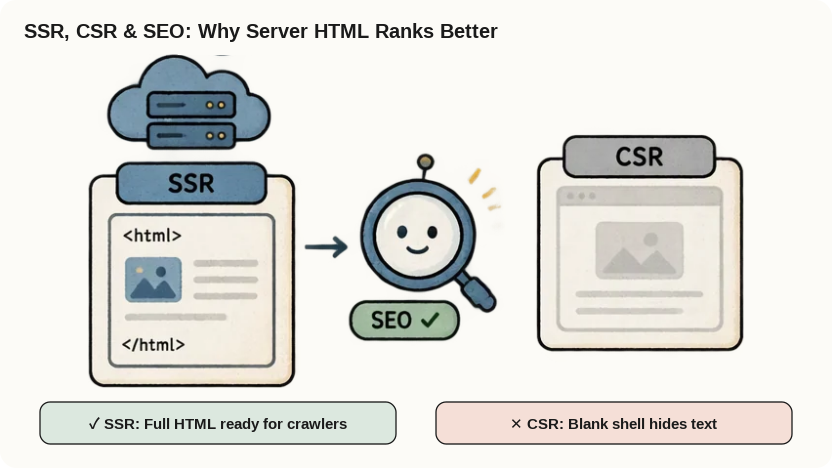
- How crawlers work: Search engines send automated programs (crawlers) to fetch your webpage's HTML, read the headings, paragraphs, and links, and store them in their search index.
- The downside of
CSR(Client-Side Rendering): Many older single-page apps send a nearly blank HTML shell plus a bundle ofJScode. The browser has to download and run theJSbefore text appears—leading to brief blank loading screens for users, and causing crawlers that inspect raw HTML to see an empty shell and leave. - The advantage of
SSR(Server-Side Rendering):Next.jssupports server-side rendering out of the box. When a user or crawler requests a URL, the server assembles the complete HTML with headings, body text, and data first, then sends it straight back. Users see formatted content immediately, and crawlers index every word cleanly.
5. npm and package.json
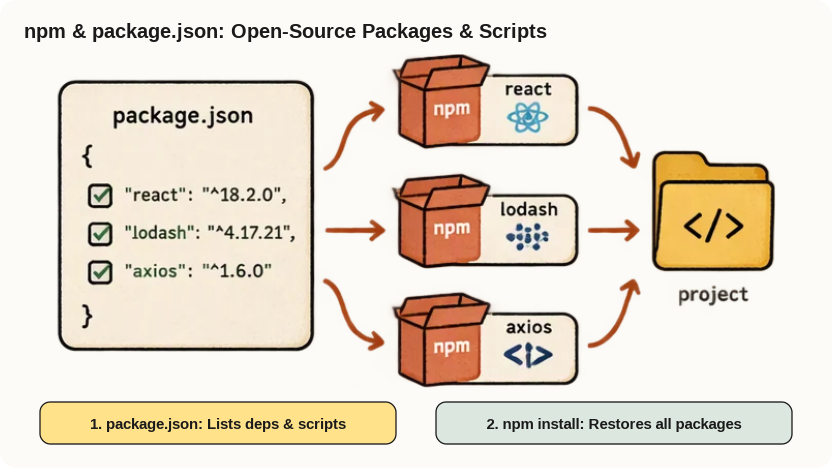
You shouldn't ask AI to code date pickers, icon sets, or animation engines from scratch when battle-tested open-source packages already exist.
npm(Node Package Manager): The command-line tool that downloads and installs those open-source packages into your project folder (for example,npm install lucide-reactinstalls the Lucide icon library).package.json: A manifest file sitting at your project root that tracks two things: every installed package with its version, and the project's shortcut scripts (such asnpm run devfor local preview andnpm run buildfor production builds). Withpackage.jsonin place, moving to a new computer only takes onenpm installto restore every dependency.